



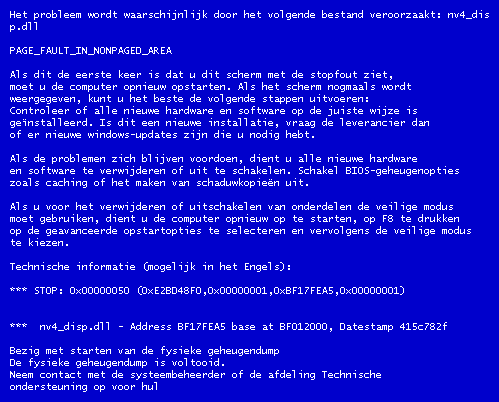
For Windows XP users may already have experienced a fatal error in Windows, Computer was suddenly dead and appears a blue screen with writing the code the code is not clear, this is called the Blue Screen Of Death or BSOD
Here I will try to explain the causes and how to solve this BSOD, especially is the intent of the codes that appear on our screens
1. IRQL_NOT_LESS_OR_EQUAL (0X0000000A)
This is a mastermind of pure culprit in the BSOD. Since most of the BSOD, this message most often appears. The error message is caused mostly because there is a mismatch drivers installed on your computer.
List of Causes:
* Problem drivers clash or do not match
* Problems Video Card, this cover is on the overclocked video card exceeds the limit or you just changed video card and you do not uninstall the old video card drivers from different chipset
* Issues Audio Card, include configuration errors or bugs in the sound card driver
2. NTFS_FILE_SYSTEM Information or FAT_FILE_SYSTEM (0X00000024) or (0X00000023)
Well, this message at least have a little "disconnected" giving a picture of where the damage was, which is on the partition or housing a filesystem, but not in HD. We can check by examining the SATA or PATA cable or can check the partition with chkdsk tool.
3. UNEXPECTED_KERNEL_MODE_TRAP (0x0000007F)
When you get a message like this, can be caused by:
* Hardware Overclock excessive
* Computer component overheating
* BIOS corrupt
* Memory and CPU is disabled
4. DATA_BUS_ERROR
This message is caused because of the possibility that memory or the memory slot on the motherboard is damaged.
5. PAGE_FAULT_IN_NONPAGED_AREA
Due to hardware damage, including main memory, video card memory, or memory in the processor (L2 Cache)
6. INACCESSIBLE_BOOT_DEVICE
Due to a mistake in the wrong hard drive jumper configuration, boot sector viruses, the wrong IDE controller drivers, or chipset driver error.
7. VIDEO_DRIVER_INIT_FAILURE
An error occurred on the installation of video card drivers are less than perfect, restart during installation or can also occur because of errors in the installation of the driver.
8. BAD_POOL_CALLER
This error can occur because of errors or incompatible drivers. Often occurs during installation of XP from an upgrade, or not from the new installation.
9. PEN_LIST_CORRUPT
This message is caused due to a damaged RAM
10. MACHINE_CHECK_EXCEPTION
Disability caused by the CPU, or an aggressively overclocked, and power supply shortages or damaged resources.
So hopefully useful and you can find the location of the damage of your computer
14 komentar:
It's actually a cool and helpful piece of info. I'm glad
that you just shared this helpful information with us.
Please stay us up to date like this. Thanks for sharing.
Have a look at my page ... click the next website page
Greetings from Carolina! I'm bored at work so I decided to browse your site on my iphone during lunch break. I really like the information you present here and can't wait to take a look when I get home.
I'm shocked at how fast your blog loaded on my mobile .. I'm
not even using WIFI, just 3G .. Anyhow, superb blog!
Feel free to visit my blog - Ohio Movers
It's in fact very difficult in this full of activity life to listen news on TV, thus I just use internet for that reason, and obtain the most recent news.
Look at my web-site: Mito slim reviews
WOW just what I was searching for. Came here by searching for skin damage
my blog post :: Cosima revival
It's remarkable designed for me to have a web page, which is good in support of my knowledge. thanks admin
Here is my web blog - Internet Money Path From Home
Wow, marvelous blog layout! How long have you been blogging for?
you made blogging look easy. The overall look of your website is
fantastic, let alone the content!
my web-site: Test Force Xtreme Testosterone
I have been surfing on-line greater than three hours nowadays,
but I never discovered any interesting article like yours.
It's lovely value enough for me. Personally, if all webmasters and bloggers made excellent content as you probably did, the net will likely be much more useful than ever before.
My webpage - Legitimate Payday Loans Online
These are really great ideas in on the topic of blogging.
You have touched some pleasant things here. Any way keep up wrinting.
Here is my weblog green coffee beans review
I tend not to comment, but after reading a few of the comments on "Error code on the Blue Screen Of Death (BSOD)".
I do have 2 questions for you if you don't mind. Could it be only me or do some of these remarks come across like they are written by brain dead visitors? :-P And, if you are posting at additional social sites, I would like to follow anything new you have to post. Could you post a list of the complete urls of all your public pages like your twitter feed, Facebook page or linkedin profile?
Here is my website :: Zinn collection reviews
Hi, i read your blog from time to time and i own a similar one and
i was just curious if you get a lot of spam remarks?
If so how do you stop it, any plugin or anything you can advise?
I get so much lately it's driving me crazy so any support is very much appreciated.
Stop by my homepage; Promotional Flash drives
Thank you for the good writeup. It in truth was a amusement account it.
Look complicated to more delivered agreeable from you!
However, how can we be in contact?
Stop by my website :: Order Goji Berry
This piece of writing is truly a good one it assists new web visitors,
who are wishing in favor of blogging.
Feel free to surf to my web blog - Natural Cleanse
Majority of the bluescreen errors are associated with corruption of the registry( if it's not a hardware issue ) so a Factory reset windows is highly recommended in order to restore the same.
a bathing ape
kyrie 7
moncler
birkin bag
canada goose outlet
golden goose
jordan 4
steph curry shoes
curry 8
supreme clothing
Post a Comment
Please leave a comment here
Comment spam and other promotions will be deleted