



If at any time you feel that your computer was getting slow performance, there are some things that cause it to happen, ranging from temporary files or junk files, or because of a virus or it could also decrease the performance of your computer hardware.
Most of the problems experienced by computer users is slow because of the mess caused by the registry, corrupt and junk files that accumulate.
Here I will provide a way out pretty good and of course Free.
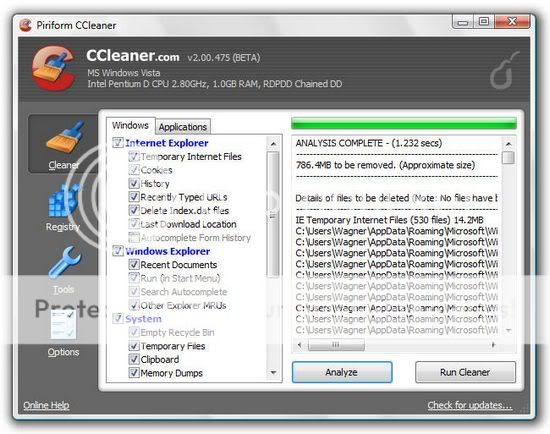
I always use CCleaner software, free software is very good but is able to clean the registry and make our computer's performance to be better
This software works by restructuring the registry, remove junk files and enhance the performance of our computers, even Hiren's boot CD also includes this software into a collection of software packages as an explanation of Piriform as the vendor of this software
CCleaner is our system optimization, privacy and cleaning tool. It removes unused files from your system - allowing Windows to run faster and freeing up hard disk space Valuable. Also it cleans traces of your online activities Such as your Internet history. Additionally it contains a fully featured registry cleaner. But the best part Is That it's fast (normally taking less than a second to run) and contains NO Spyware or Adware!
Cleans the Following:
Internet Explorer
Temporary files, history, cookies, Autocomplete form history, index.dat.
Firefox
Temporary files, history, cookies, download history, form history.
Google Chrome
Temporary files, history, cookies, download history, form history.
Opera
Temporary files, history, cookies.
Safari
Temporary files, history, cookies, form history.
Windows
Recycle Bin, Recent Documents, Temporary files and Log files.
Registry Cleaner
Advanced features to remove unused and old entries, Including File Extensions, ActiveX Controls, ClassIDs, ProgIDs, Uninstallers, Shared DLLs, Fonts, Help Files, Application Paths, Icons, Invalid Shortcuts and more ... Also comes with a comprehensive backup feature.
Third-party applications
Removes temp files and recent file lists (MRUs) from many apps Including Media Player, eMule, Google Toolbar, Netscape, Microsoft Office, Nero, Adobe Acrobat, WinRAR, WinAce, WinZip and many more ...
100% Spyware FREE
This software does NOT contain any Spyware, Adware or Viruses.
I think you need to try this software,
you can download this software at :
Read More …
This software works by restructuring the registry, remove junk files and enhance the performance of our computers, even Hiren's boot CD also includes this software into a collection of software packages as an explanation of Piriform as the vendor of this software
CCleaner is our system optimization, privacy and cleaning tool. It removes unused files from your system - allowing Windows to run faster and freeing up hard disk space Valuable. Also it cleans traces of your online activities Such as your Internet history. Additionally it contains a fully featured registry cleaner. But the best part Is That it's fast (normally taking less than a second to run) and contains NO Spyware or Adware!
Cleans the Following:
Internet Explorer
Temporary files, history, cookies, Autocomplete form history, index.dat.
Firefox
Temporary files, history, cookies, download history, form history.
Google Chrome
Temporary files, history, cookies, download history, form history.
Opera
Temporary files, history, cookies.
Safari
Temporary files, history, cookies, form history.
Windows
Recycle Bin, Recent Documents, Temporary files and Log files.
Registry Cleaner
Advanced features to remove unused and old entries, Including File Extensions, ActiveX Controls, ClassIDs, ProgIDs, Uninstallers, Shared DLLs, Fonts, Help Files, Application Paths, Icons, Invalid Shortcuts and more ... Also comes with a comprehensive backup feature.
Third-party applications
Removes temp files and recent file lists (MRUs) from many apps Including Media Player, eMule, Google Toolbar, Netscape, Microsoft Office, Nero, Adobe Acrobat, WinRAR, WinAce, WinZip and many more ...
100% Spyware FREE
This software does NOT contain any Spyware, Adware or Viruses.
I think you need to try this software,
you can download this software at :
