There are many things we can do to improve the overall performance of windows, in addition to increased RAM memory also can take advantage of our free software below to perform maintenance, repair and optimization of computer systems.
1. Advance System Care Free
Advance Care System is a free tool that must be installed to keep the computer system remains optimal. Advance Care System capable of doing almost all the processes for maintenance and repair of windows operating system. Maintain menu consists primarily of Windows that consists of Spyware Removal, Registry Fix, Privacy and Junk Files Clean Sweep, Diagnose System for analysis of performance and security problems and Utilities menu consisting of tools useful to do tuneup, protection, cleaning and manages windows system.
URL: http://www.iobit.com
2. CCleaner
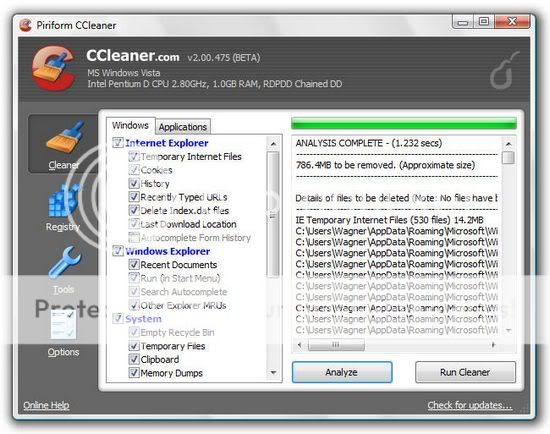
This application can clean the hard disk from junk files, repair registry and get rid of applications that are not needed in order to improve overall computer system performance. I also use this application
URL: http://www.CCleaner.com
3. Revo Uninstaller
In the Advanced System Care program has found the menu Advanced Uninstaller to uninstall programs that are not needed. If the application is deemed inadequate we can use Revo Uninstaller program, program is also very good to remove applications that normally can not be uninstalled because the uninstaller file corrupted or virus. There is also a portable version of this application so it does not need to be installed into the system.
URL: http://www.revouninstaller.com
4. Norman Malware Cleaner
To clean your computer from viruses and malware, we can use Norman Malware Cleaner. To further optimize the scanning process, should disconnet computer from the network and run Windows in Safemode mode. Norman Malware Cleaner is usually at about 2-weekly updates, and can be downloaded at http://www.softpedia.com/get/Antivirus/Norman-Malware-Cleaner.shtml.
5. Checkdrive
Checkdrive application works just like scandisk on windows application. Checkdrive will detect and fix errors that occur on the hard disk such as damage that occurs because the computer does not shut down properly. As a result of the damage on the hard drive can cause the computer to hang or even the system can not boot at all.
URL: http://www.abelssoft.de
6. MyDefrag
One way to improve the performance of windows is by doing a defragmentation of the files that are scattered on the hard disk. This application can do so without disrupting the work process of other applications. Not only hard drives, with this application we can also defragment the USB flash and SSD drives.
URL: http://www.Mydefrag.com
7. Registry System Wizard
Registry System Wizard is used to tweaking Windows by changing the parameters in the registry. With this application we simply choose a version of Windows that is used later to modify some settings necessary to optimize the performance of windows.
URL: http://www.winfaq.de/download_rsw.htm
8. Beta TeraCopy
To improve the performance of windows in the process of lawyer-copyan files especially the files / folders that have a large size, we can use the application TeraCopy Beta Free. Once installed, TeraCopy will replace Windows Explorer copy function, copy and paste process is automatically handled by the program TeraCopy. With this application or move a file copy process will be faster and stable.
URL: http://www.codesector.cm/teracopy.php
Good luck
Read More …
Showing posts with label Free Download. Show all posts
Freeware for improving the performance of Windows
Label: Ccleaner, Free Download, Free Software, Software, Speed Up Computer 5 komentarFirefox 4 beta Mozilla's latest browser
Label: Comodo Dragon, Firefox, Flashdisk, Free Download, HTML, HTML 5, Linux, Mozilla Firefox, Web Browser, Website 0 komentarMozilla Browser promises super-fast, and has been realized with the release of the latest Firefox version 4 beta, which was released a few months ago, although it has released version 4 is not meant to stop the project Mozilla Firefox 3.x
Mozilla promises something new in the latest Firefox
Although still in beta but there are some improvements made include full support to the graph of three-dimensional (3D) standards-based WebGL.
"Firefox 4 beta now supports WebGL for graphics card built-in common modern use. This makes the developers more easily create interactive 3D games, graphics are clear, and a new visual experience on the Web without depending on plug-ins from third party," said Mike Beltzner, Firefox Product Manager, in his blog
WebGL latest technology is an open standard for the present three-dimensional graphics on the web. With the WebGL in your browser, you no longer need Java, Flash, or other additional programs to display three-dimensional animation. This is one product that utilizes HTML5 elements which supported many browser developers, such as Google Chrome, Opera, and Apple Safari
Newest release is available for versions of Windows, OSX and Linux.
several new features include:
* Claimed faster than previous versions.
* In the version of windows was moved above the tabs.
* On Windows Vista and 7, the menu bar is replaced with Firefox button.
* New Add-Ons Manager.
* Supports HD-quality video format HTML5 Web
* Improved Privacy
* Protection of Crash
Also in the top right of the browser there is also the feedback button to find out whether users are satisfied or not with Firefox. The shape of the happy or unhappy, it allows users to participate in the project Firefox 4 beta is easily and quickly
At first glance these look like Firefox 4 beta Safari, Chrome and Comodo Dragon
Download Firefox 4 beta here
Read More …
"Firefox 4 beta now supports WebGL for graphics card built-in common modern use. This makes the developers more easily create interactive 3D games, graphics are clear, and a new visual experience on the Web without depending on plug-ins from third party," said Mike Beltzner, Firefox Product Manager, in his blog
WebGL latest technology is an open standard for the present three-dimensional graphics on the web. With the WebGL in your browser, you no longer need Java, Flash, or other additional programs to display three-dimensional animation. This is one product that utilizes HTML5 elements which supported many browser developers, such as Google Chrome, Opera, and Apple Safari
Newest release is available for versions of Windows, OSX and Linux.
several new features include:
* Claimed faster than previous versions.
* In the version of windows was moved above the tabs.
* On Windows Vista and 7, the menu bar is replaced with Firefox button.
* New Add-Ons Manager.
* Supports HD-quality video format HTML5 Web
* Improved Privacy
* Protection of Crash
Also in the top right of the browser there is also the feedback button to find out whether users are satisfied or not with Firefox. The shape of the happy or unhappy, it allows users to participate in the project Firefox 4 beta is easily and quickly
At first glance these look like Firefox 4 beta Safari, Chrome and Comodo Dragon
Download Firefox 4 beta here
How to Speed up Computer Performance
Label: Ccleaner, Free Download, Free Software, Operating System, Piriform, Registry, Registry Cleaner, Software, Speed Up Computer 0 komentarIf at any time you feel that your computer was getting slow performance, there are some things that cause it to happen, ranging from temporary files or junk files, or because of a virus or it could also decrease the performance of your computer hardware.
Most of the problems experienced by computer users is slow because of the mess caused by the registry, corrupt and junk files that accumulate.
Here I will provide a way out pretty good and of course Free.
I always use CCleaner software, free software is very good but is able to clean the registry and make our computer's performance to be better
This software works by restructuring the registry, remove junk files and enhance the performance of our computers, even Hiren's boot CD also includes this software into a collection of software packages as an explanation of Piriform as the vendor of this software
CCleaner is our system optimization, privacy and cleaning tool. It removes unused files from your system - allowing Windows to run faster and freeing up hard disk space Valuable. Also it cleans traces of your online activities Such as your Internet history. Additionally it contains a fully featured registry cleaner. But the best part Is That it's fast (normally taking less than a second to run) and contains NO Spyware or Adware!
Cleans the Following:
Internet Explorer
Temporary files, history, cookies, Autocomplete form history, index.dat.
Firefox
Temporary files, history, cookies, download history, form history.
Google Chrome
Temporary files, history, cookies, download history, form history.
Opera
Temporary files, history, cookies.
Safari
Temporary files, history, cookies, form history.
Windows
Recycle Bin, Recent Documents, Temporary files and Log files.
Registry Cleaner
Advanced features to remove unused and old entries, Including File Extensions, ActiveX Controls, ClassIDs, ProgIDs, Uninstallers, Shared DLLs, Fonts, Help Files, Application Paths, Icons, Invalid Shortcuts and more ... Also comes with a comprehensive backup feature.
Third-party applications
Removes temp files and recent file lists (MRUs) from many apps Including Media Player, eMule, Google Toolbar, Netscape, Microsoft Office, Nero, Adobe Acrobat, WinRAR, WinAce, WinZip and many more ...
100% Spyware FREE
This software does NOT contain any Spyware, Adware or Viruses.
I think you need to try this software,
you can download this software at :
Read More …
This software works by restructuring the registry, remove junk files and enhance the performance of our computers, even Hiren's boot CD also includes this software into a collection of software packages as an explanation of Piriform as the vendor of this software
CCleaner is our system optimization, privacy and cleaning tool. It removes unused files from your system - allowing Windows to run faster and freeing up hard disk space Valuable. Also it cleans traces of your online activities Such as your Internet history. Additionally it contains a fully featured registry cleaner. But the best part Is That it's fast (normally taking less than a second to run) and contains NO Spyware or Adware!
Cleans the Following:
Internet Explorer
Temporary files, history, cookies, Autocomplete form history, index.dat.
Firefox
Temporary files, history, cookies, download history, form history.
Google Chrome
Temporary files, history, cookies, download history, form history.
Opera
Temporary files, history, cookies.
Safari
Temporary files, history, cookies, form history.
Windows
Recycle Bin, Recent Documents, Temporary files and Log files.
Registry Cleaner
Advanced features to remove unused and old entries, Including File Extensions, ActiveX Controls, ClassIDs, ProgIDs, Uninstallers, Shared DLLs, Fonts, Help Files, Application Paths, Icons, Invalid Shortcuts and more ... Also comes with a comprehensive backup feature.
Third-party applications
Removes temp files and recent file lists (MRUs) from many apps Including Media Player, eMule, Google Toolbar, Netscape, Microsoft Office, Nero, Adobe Acrobat, WinRAR, WinAce, WinZip and many more ...
100% Spyware FREE
This software does NOT contain any Spyware, Adware or Viruses.
I think you need to try this software,
you can download this software at :
Top 4 Best free Antivirus
Label: Antivirus, AVG, Avira Antivir, Comodo, Comodo Internet Security, Free Antivirus, Free Download, Free Software, Hiren's, Smadav, Virus 0 komentar
Actually, today I will try to discuss about the Hiren's Boot CD 11.0 is remarkable, but I delayed till tomorrow.
Now I will try to show some good performers Free Antivirus according to my experience:
The purpose here is the best in terms of security, and memory consumption that influence the performance of our computer.
Here I include four antivirus which became a recommendation from me:
1 Comodo Internet Security
Comodo prioritize the security of Internet attacks with a very strong firewall defenses, all activities will be monitored very well, so if there is any suspicious activity can be directly prevented.
In terms of antivirusnya, Comodo is very sensitive. Comodo Internet Security suited for those of you who are always online to the Internet. visit www.comodo.com
Comodo Internet Security please download here
2. Avira Antivir Personal
This is an alternative antivirus for those of you who do not always online, because it has the ability Offline antivirus update, in terms of this antivirus defense has a pretty good detection capability, as well as self defense from a virus attack.
Download Avira Antivir Personal here
3. AVG Free
AVG is the antivirus product with the user very much, more than 80 million users worldwide, the ability of detection is good enough but when the scan would take a lot of memory so make the computer becomes feels slow. This could be an alternative for your free Antivirus
Download AVG Free here
4. SmadAV
Antivirus made in Indonesia, this performance is very light and capable of removing viruses made in Indonesia, in terms of defense capabilities are not adequate, but there is a feature to open some important tools of Windows which is disabled by viruses, such as regedit, task manager, run command and so forth, one click we can all be opened without manually changing the registry.
SmadAV very good when combined with one of the top three antivirus
Download SmadAV Free here
How to create Windows XP live CD
Label: Boot CD, Free Download, ISO, Nero, Trick Windows, Windows 0 komentarTo create a Windows XP Live CD we will require
1. Bart PEbuilder
2. A CD burner like Nero
3. A bootable Windows XP CD and
Step 1: Download PeBuilder from here and install it. Make sure you have enough free space on the drive where you install the program. After you have finished adding all programs it will create an ISO to be burned into a disk. The size of the ISO will depend upon how many programs you add to your live CD. I would recommend atleast 700MB of free space.
Step 2: You may want to set a wallpaper that will appear on the desktop when you boot the CD. For this open the folder where you have installed PEbuilder and replace the file bartpe.bmp with the wallpaper of your choice.
Step 3: Download XPE plugin from here (direct download link). It's the GUI shell of the XP Live CD that will create the XP start button and taskbar. You are free to download as many plugin (applications) you want. Currently there are more than 500 applications to choose from. Both freewares and commercial applications are available. Antivirus programs like Kaspersky, NOD32, Avast; burning program Nero; media players like VLC; OpenOffice, Foxit PDF reader, Acrobat Reader etc are available.
Step 4: After you have finished downloading all your favourite programs, open PEbuider and specify the source path to the Windows XP installation bootable CD. You can copy the CD to your hard disk and point the source to the copied file.
Step 5: Click Plugins and add all the plugins you have downloaded. Since we have added XPE, disable nu2shell and the startup group from the list of plugins.
Step 6: Specify the ISO image file and click Build. The program will integrate the plugins and create an ISO image.
Step7: Burn the image into a disk using any burning software and your live CD is ready.
The Live CD Desktop
Running Abiword
Running VLC Media Player
Read More …
Subscribe to:
Posts (Atom)
Copyright © 2009-2012 Computer Knowledge. All rights reserved.