For the umpteenth time
Hiren's BootCD released Kit Bootable CD that makes me always amazed.
Several times I post articles about these
Hiren's BootCD, Hiren's BootCD began Edition 11.0,
Hiren's BootCD 12.0,
Hiren's BootCD 13.0 and this time I will try to review on Hiren's BootCD 1.13 with all his ability is very powerful.
Hiren's BootCD Version 13.1 is an Update from
Hiren's BootCD 13.0
This is a change from Hiren's BootCD versions 13.0 to 13.1 the
addition of several new software include:
* Atlantis Word Processor 1.6.5.3: Compact, fast-loading, but still powerful and efficient, perfect companion for a wide range of your word processing tasks, supports RTF, MS Word DOC 6.0/95/97/2000/XP/2003 and DOCX (Windows Shareware).
* Auto Mount Drives 1.0: Auto Mount Drives Can Be Used to mount unmounted / hidden drives (Windows Freeware).
* Complete Internet Repair 0.9.5.955: All in one tool to repair a common internet connection issues, it attempts to repair everything internet related on a Windows system (Windows Freeware).
* MiniXP: More SATA / SCSI / SAS storage drivers added / updated, U.S. Dvorak keyboard layout added, the keyboard layout switcher added in the system tray.
* Mouse Emulator 2.2: You can use your Numpad keyboard as a mouse, very useful if your mouse is broken or if you are having USB driver problems (Windows Freeware).
* Prime95 25.11: This earnest detect for errors in CPU or RAM Within a matter of minutes if an overclock is not stable, you cans Torture Test run (burn-in) overnight to Ensure Long-term stability of the hardware (Windows Freeware).
* Spread32 1:18: Mini Excel with all of the basic features of a spreadsheet program. Run macros, draw objects, generate charts, calculate functions and Formulas, reads and writes xls, csv, text, and pxl formats (Windows Freeware).
* Volume Serial Number Changer 1.2: Allow you to change the drive's serial number on FAT, FAT32 and NTFS file systems (Windows Freeware).
* WDIDLE3 1:05: Modifies the behavior of a Western Digital Green drives to wait longer before positioning the heads in Their park position and turning off unnecessary electronics (Dos Freeware).
and update the old software and antivirus database include:
Avira AntiVir Personal (07-02-2011), ComboFix (07-02-2011), Double Driver 4.1, Dr.Web CureIt! Antivirus (07-02-2011), GPU-Z (Works from MiniXP), grub4dos 2011-01-15, grubinst 1.2, HBCD Customizer 1.6, HBCD Program Launcher 2.1, Malwarebytes Anti-Malware 1.50.1 (07-02-2011 ), Memtest86 + 4:20, RMPrepUSB 2.1.617, S & M Stress Tests (Works from MiniXP), Spybot - Search & Destroy 1.6.2 (07-02-2011), SpywareBlaster 4.4 (07-02-2011), SUPERAntiSpyware 4.47.1000 ( 07-02-2011).
And there is some software on Hiren's 13.0 is reduced, among others:
* DriverBackup!
* SmitFraudFix (No longer updated, Alternatives Combofix / RKill / Malwarebytes)
So Hiren's BootCD 13.1 contains:
Antivirus Tools
* Avira AntiVir Personal (07-02-2011): Free anti-virus and anti-spyware on-demand scanner, detects and removes viruses More Than 50 000 (Windows Freeware).
* ComboFix (07-02-2011): Designed to cleanup of malware infections and restore the settings modified by malware (Windows Freeware).
* CWShredder 2:19: Popular CoolWebSearch Trojan Remover tool (Windows Freeware).
* Dr.Web CureIt! Antivirus (07-02-2011): A free standalone anti-virus and anti-spyware on-demand scanner (Windows Freeware).
* GMER 1.0.15: Hidden services, hidden registry, hidden file scanner, Rootkit Detector and Remover (Windows Freeware).
* Malwarebytes Anti-Malware 1.50.1 (07-02-2011): Anti-malware application That cans thoroughly remove even the most advanced malware (Windows Freeware).
* Remove Fake Antivirus 1.72: A tool to remove viruses / malwares the which disguises Itself to be an antivirus and produces fake alerts / warnings and urge you to purchase a useless copy of the fake antivirus (Windows Freeware).
* RootkitRevealer 1.7.1: Rootkit Revealer is an advanced patent-pending root kit detection utility (Windows Freeware).
* Spybot: Search & Destroy 1.6.2 (07-02-2011): Application to scan for spyware, adware, hijackers and other malicious software (Windows Freeware).
* SpywareBlaster 4.4 (07-02-2011): Prevent the installation of spyware and other Potentially unwanted software (Windows Freeware).
* SuperAntiSpyware 4.47.1000 (07-02-2011): Remove Malware, Rootkits, Spyware, Adware, Worms, Parasites (a must have tool) (Windows Freeware).
Backup Tools
* COPYR.DMA Build013: A Tool for making copies of hard disks with bad sectors (Dos Freeware).
* CopyWipe 1:14: Copy old hard drive to a new hard drive by copying the entire contents of one drive to another, cans Also Help Prevent CopyWipe confidential or private data from being recovered, by securely wiping the contents of a drive (Windows / Dos Freeware .)
* DiskImage 1.6: Creates and writes disk images files to hard and floppy disks (Windows Freeware).
* Double Driver 4.1: Driver Backup and Restore tool (Windows Freeware).
* Drive SnapShot 1:40: Creates an exact Disk Image of your system into a file while windows is running (Windows Shareware).
DriveImage XML * 2:20: Backup any drive / partition to an image file, even if the drive is currently in use, a very good freeware alternative to Ghost / Acronis (Windows Freeware).
* FastCopy 2:06: The Fastest Copy / Delete Software on Windows (Windows Freeware).
* G4l Ghost 4 Linux 0.34a: A hard disk and partition imaging and cloning tool similar to Norton Ghost (Linux Freeware).
* GImageX 2.0.17: ImageX is Used to backup / restore WIM images for Windows XP / Vista and Windows 7 (Windows Freeware).
* ImgBurn 2.5.2.0: Lightweight CD / DVD / HD DVD / Blu-ray burning application, supports BIN, CUE, DI, DVD, GI, IMG, ISO, MDS, NRG and PDI, Ability to build a DVD / HD / BD Video discs from a VIDEO_TS / HVDVD_TS / BDAV / BDMV folders, Unicode folder / file names (formerly DVD Decrypter) (Windows Freeware).
* InfraRecorder 0:51: An Open-source CD / DVD burning software, Also create / burn. Iso images (Windows Freeware).
* Macrium Reflect 4.2.2952: Create complete backups of your disk partitions, Including the operating system, installed programs and all your settings (Windows Freeware).
* Partition Image: partimage 0.6.9: Supported filesystems includes Ext2, Ext3, Reiserfs, HFS, HPFS, JFS, XFS, UFS, FAT16, FAT32 and NTFS (Linux Freeware).
* Partition Saving 3.90: A tool to backup / restore partitions (SavePart.exe) (Windows / Dos Freeware).
* Raw Copy 1.2: Useful tool to transfer the data directly from a faulty drive to another drive, built-in data recovery function Also the which earnest attempt to recover data from bad sectors (Windows Freeware).
* RegBak 1.0: A light-weight and simple utility to create backups of Windows registry files (Windows Freeware).
* Seagate DiscWizard 11.8326: Backup drive / partition to an image file, for Seagate owners (Powered by Acronis TrueImage) (Windows / Linux Freeware).
* SelfImage 1.2.1.92: To create image files of any mounted or unmounted hard disk partition (Windows Freeware).
* ShadowCopy 1:00: Copy all your files and entire systems: even if They are locked by Windows (Windows Freeware).
* Smart Driver Backup 2.12: Easy backup of your Windows device drivers (Also works from PE) (Windows Freeware).
* TeraCopy 2.12: TeraCopy is a compact program Designed to copy and move files at the maximum possible speed, Providing the user a lot of features includes pause, resume, auto shutdown, verify, error recovery and unicode support (Windows Freeware).
* WhitSoft File Splitter 4.5a: A Small File Split / Join tool (Windows Freeware).
* XXClone 0.58.0: The simple way to clone a Windows disk to another disk, it makes a self-bootable clone of Windows system disk (Windows Freeware).
BIOS / CMOS Tools
*! BIOS 3:20: A powerful utility for bios and cmos (Dos Freeware).
Award DMI Configuration Utility * 2:43: DMI Configuration utility for modifying / viewing the contents MIDF (Dos Freeware).
* BIOS Cracker 5.0 BIOS password remover (CmosPwd) (Dos Freeware).
* Utility 1.35.0 BIOS: BIOS Informations, password, beep codes and more (Dos Freeware).
* 0.93 CMOS: CMOS Save / Restore Tool (Dos Freeware).
* DISKMAN4: A powerful all in one utility (Windows / Dos Freeware).
* Kill CMOS: A tiny utility to wipe cmos (Dos Freeware).
* UniFlash 1:40: Bios flash utility (Dos Freeware).
Browsers / File Managers
9:20 * 7-Zip: File Archiver with a high compression ratio Supports 7z, ARJ, BZIP2, CAB, CHM, cpio, DEB, DMG, FAT, GZ, GZIP, HFS, IMA, IMG, ISO, LZH, LZMA, MBR, MSI, NSIS, NTFS, RAR, RPM, TAR, UDF, VHD, WIM, XAR, XZ, ZIP and Z formats (Windows Freeware).
* Bulk Rename Utility 2.7.1.2: Rename multiple files, change timestamps and rename using EXIF data with the click of a button (Windows Freeware).
* Dos Command Center 5.1: Classic dos-based file manager (Dos Freeware).
* Dos Navigator 6.4.0: Dos File Manager, Norton Commander clone but has much more features (Dos Freeware).
* EasyUHA 1.1: GUI tool to create and extract UHA Archives (Windows Freeware).
* Everything 1:21: Ultra-fast file / folder search tool with ftp / http server (Windows, Freeware).
* Explore2fs 1.08b: GUI explorer tool for accessing Linux ext2 and ext3 filesystems under windows (Windows Freeware).
* Ext2Explore 2.2.71: To explore ext2/ext3/ext4 disk / partition, can Also be Used to view and copy the disk and file system images (Windows Freeware).
* FastLynx 2.0: Dos file manager with Pc to Pc file transfer capability (Dos Freeware).
* File Maven 3.5: An advanced Dos file manager with high speed PC-to-PC file transfers via serial or parallel cable (Dos Freeware).
* File Wizard 1:35: A file manager: colored files, drag and drop copy, move, delete etc (Dos Freeware).
* HashMyFiles 1.68: Calculate MD5/SHA1/CRC32 hashes of your files (Windows Freeware).
* Mini Windows 98: Can run from Ram Drive, with ntfs support, 7-Zip, Disk Defragmenter, Notepad / RichText Editor, Image Viewer,. Avi. Mpg. Divx. Xvid Movie Player, etc. (Windows Commercial).
* Mini Windows XP: Windows Xp Portable That runs from CD / USB / Ram Drive to repair / recover dead windows operating system. It has LAN and WLAN (Wireless) Network includes 300 WiFi / Ethernet card drivers and cans Also Easily be customized to add your own drivers in HBCD \ Drivers folder. Added Some USB 3.0 and SATA Storage drivers and VBS / WSH scripting support. Supported keyboard layouts are: United States, United Kingdom, Turkish Q, Turkish F, Swiss German, Swiss French, Swedish, Finnish Finnish, Spanish, Slovenian, Slovak, Russian, Portuguese, Polish, Norvegian Norske, Netherlands Dutch, Latin American, Italy , Icelandic, Hungarian, Hebrew, Germany, Germany Switzerland Luxembourg, Francais Cavier AZERTY, Denmark Daenish, phonetic Bulgarian, Bulgarian, Brazilian Portuguese, Brazilian Portuguese and Belgium Extended (Windows Commercial).
* Opera Web Browser 9.64: One of the fastest, smallest and smartest full-featured Web browser (Windows Freeware).
* SearchMyFiles 1.61: Alternative to 'Search For Files And Folders "module of Windows + Duplicates Search (Windows Freeware).
* Total Commander 7.56a: A file manager similar to the Windows Explorer features side-by-side file-browsing panes, a built-in FTP, archive management, file search / compare / synchronize and more (Windows Shareware).
* Volkov Commander 4.99: Dos File Manager with LongFileName / ntfs support (Similar to Norton Commander) (Dos Freeware).
* WinMerge 2.12.4.0: differencing and merging tool cans compare the which both folders and files, presenting differences in a visual text format That Is Easy to understand and handle (Windows Freeware).
Cleaners
* ATF Cleaner 3.0.0.2: A personalized and easy-to-use temp files removal software to clean all user temp folders, Java cache, Opera / Mozilla browser cache, cookies, history, download history, saved passwords etc (Windows Freeware).
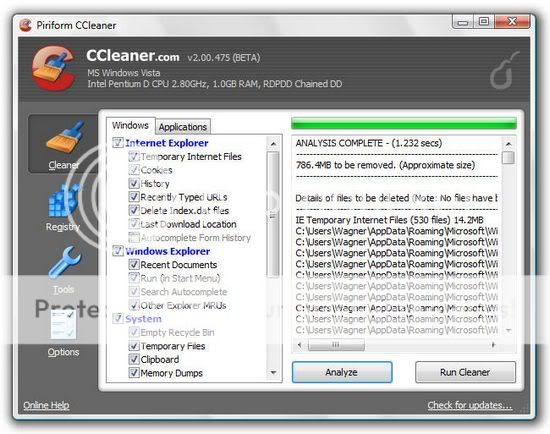
* CCleaner 3.02.1343: Crap Cleaner is a freeware system optimization and privacy tool (Windows Freeware).
* CleanUp! 4.5.2: Removes junk files from all user profiles That accumulate over time and litter your hard drive (Windows Freeware).
* CloneSpy 2:52: Duplicate file cleanup tool, can optionaly create hardlinks to save space (Windows Freeware).
* Data Shredder 1.0: A tool to Erase disk and files (Also wipe free space) securely (Windows Freeware).
* Delete Doctor 2.2: Delete Files That are hard to delete, Option to delete on reboot or via UNC Name (Windows Freeware).
* Duplicate File Finder 3.5: Scans and identify duplicate files, it compares Them based on byte for byte comparison ensures 100% accuracy (Windows Freeware).
* MyUninstaller 1.70: Alternative to the standard add / remove control panel module (Windows Freeware).
* Revo Uninstaller 1.90: Remove unnecessary files and registry entries left behind by incomplete uninstallation program routines (Windows Freeware).
* SpaceMonger 1.4: Keeping track of the free space on your computer (Windows Freeware).
* SpaceSniffer 1.1.2.0: Find a lost space on your disks the easy way (Windows Freeware).
* WinDirStat 1.1.2.80: A disk usage statistics viewer and cleanup tool for Windows (Windows Freeware).
Editors / viewers
* Atlantis Word Processor 1.6.5.3: Compact, fast-loading, but still powerful and efficient, perfect companion for a wide range of your word processing tasks, supports RTF, MS Word DOC 6.0/95/97/2000/XP/2003 and DOCX (Windows Shareware).
* HxD 1.7.7.0: Hex Editor Provides tools to Inspect and edit files, main memory, disks / disk images (Windows Freeware).
* IrfanView 4:28: A free Image Viewer / Editor / Converter and Optimizer (Windows Freeware).
* Picture Viewer 1.94: Picture viewer for dos, supports more then 40 filetypes (Dos Freeware).
* QuickView Pro 2:58: Movie viewer for dos, supports many formats Including divx (Dos Freeware).
* Spread32 1:18: Mini Excel with all of the basic features of a spreadsheet program. Run macros, draw objects, generate charts, calculate functions and Formulas, reads and writes xls, csv, text, and pxl formats (Windows Freeware).
* SumatraPDF 1.1: A free, open source, lightweight PDF reader for Microsoft Windows (Windows Freeware).
Filesystems Tools
* AlternateStreamView 1:15: View / Copy / Delete Hidden NTFS Alternate Data Streams (Windows Freeware).
* EditBINI 1:01: To Edit boot.ini on NTFS Partition (Dos Freeware).
* FileDisk Mount Tool 25: To mount an ISO / BIN / NRG / MDF / IMA / IMG images on windows (Windows Freeware).
* Philemon 7:04: Monitors and displays file system activity on a system in real-time (Windows Freeware).
* NewSID 4.10: Utility That changes the security ID (SID) for Windows NT, 2000 and XP (Windows Freeware).
* NTFS Access 2.1: Set NTFS permissions recursively and full access rights to a folder / file owner (Windows Freeware).
* NTFS Dos 3:02: To read-only access ntfs partitions from Dos (Dos Freeware).
* NTFS4Dos 1.9: To read and write ntfs partitions from Dos (Dos Freeware).
* Virtual Floppy Drive 2.1: Enables you to create and mount a virtual floppy drive on your NT/2000/XP/Vista (Windows Freeware).
Hard Disk Tools
* Active Kill Disk 04/01/2393: Securely overwrites and destroys all data on physical drive (Dos Freeware).
* Darik's Boot and Nuke (DBAN) 1.0.7: Completely deletes the contents of any hard disk it cans detect (Linux Freeware).
* DiskView 2.4: To view a graphical map of your disk, allowing you to check Nowhere a file is located or, by clicking on a cluster, seeing the which file occupies it (Windows Freeware).
* DiskWipe 1.2: Securely erases the contents of a disk replacing it with random data or Leaving the drive is completely blank (Windows Freeware).
* ExcelStor's ESTest 4:50: ExcelStor hard disk diagnostic utility (Dos Freeware).
* Fujitsu HDD Diagnostic Tool 7:00: To check the IDE drives for possible defects / problems (Dos Freeware).
* Fujitsu IDE Low Level Format 1.0: Low Level Format Tool for Fujitsu Drives (Dos Freeware).
* 5:12 GwScan Gateway: Gateway hard drive diagnostic utility (Dos Freeware).
* Hard Disk Sentinel 1.00.5: Hard Disk health, performance and temperature monitoring tool (Dos Freeware).
* HDAT2 4:53: The main function is testing and repair (regenerates) bad sectors for detected devices. A freeware alternative of HDD Regenerator (Dos Freeware).
* HDD Capacity Restore 1.2: This tool allows you to restore factory capacity of any hard drive. it does not read from or write to the user data area or perform any kind of formatting, only alters the HDD firmware (HPA and DCO settings) (Windows Freeware).
* HDD Erase 4.0: Secure erase using a special feature built into most newer hard drives (Dos Freeware).
* HDD Low Level Format Tool 2:36: Low-level formatting tool for S-ATA (SATA), IDE (E-IDE), SCSI, USB, Flash Cards and FireWire external drive enclosures (Windows Freeware).
* IBM Hitachi Drive Fitness Test 4.16: Quickly and reliably tests SCSI, IDE and SATA drives (Dos Freeware).
* IBM Hitachi Feature Tool 2.15: Allows you to control Some of the features of the the HDD (Dos Freeware).
* Maxtor utility amset 4.0: Utility for changing Acoustic Management on the hard drives (Dos Freeware).
* Maxtor Low Level formatter 1.1: Maxtor's Low Level Format Utility works on any hard drive (Dos Freeware).
* Maxtor POWERMAX 4:23: Designed to perform diagnostic read / write verifications on Maxtor / Quantum hard drives (Dos Freeware).
* MHDD 4.6: Precise diagnostics of the mechanical part of a drive, perform Low-level format, Bad Sector Sepair, access raw sectors, manage SMART (SMART) and other drive parameters Such as acoustic management, security, Host Protected Area, etc (Dos Freeware).
* Samsung Disk Diagnose (SHDIAG) 1:28: To diagnose the disk Pls suspected to have failures (Dos Freeware).
* Samsung ESTOOL 3.01v: Drive Diagnostic, Automatic Acoustic Management, Enable / Disable SMART etc (Dos Freeware).
* Samsung HDD Utility (HUTIL) 2.10: The Drive Diagnostic Utility (Dos Freeware).
* SeaTools for Dos: Text 1:10 2:22 GUI versions to test Seagate or Maxtor Parallel ATA (PATA and IDE) and Serial ATA (SATA) interface disc drives (Dos Freeware).
* SmartUDM 2:00: Hard Disk Drive S.M.A.R.T. Viewer (Dos Freeware).
* Toshiba Hard Disk Diagnostic 2.00b: Toshiba hard drive diagnostic utility (Dos Freeware).
* Victoria 3.33e and 3.52rus: A freeware program for low-level HDD diagnostics (Dos Freeware).
* Victoria 4:46: Universal program for testing storage devices (Windows Freeware).
* ViVard 1.0: low-level HDD diagnostics, Surface test with remap, SMART-attributes etc (Dos Freeware).
* WDClear 1:30: Restore / erases the drive back to a factory condition (Dos Freeware).
* WDIDLE3 1:05: Modifies the behavior of a Western Digital Green drives to wait longer before positioning the heads in Their park position and turning off unnecessary electronics (Dos Freeware).
* Western Digital Data Lifeguard Tools 1:22: To perform drive identification, diagnostics, and repairs on most WD drives (Windows Freeware).
* Western Digital Data Lifeguard Tools 11.2: For the installation of Western Digital EIDE Hard Drives (Dos Freeware).
* Western Digital Diagnostics (DLGDIAG) 5:19: To Quickly and efficiently verify the status of the drive (Dos Freeware).
MBR (Master Boot Record) Tools
* Bellavista 1.1.0.54: Formerly BCD Editor with lots of options to configure Windows for a developer (Windows Freeware).
* Boot Partition 2.60: add Partition in the Windows NT/2000/XP Multi-boot loader (Dos Freeware).
* BootFix Utility: Run this utility if you get 'Invalid system disk' message (Dos Freeware).
* BootICE 0.80.6: A boot sector manipulation utility (Windows Freeware).
* Bootsect 6.0.6: Boot Sector Manipulation Tool This tool replaces FixFAT.exe and FixNTFS.exe (Windows Freeware).
* Diskman 4.2: All in one tool for cmos, bios, BootRecord and more (Windows / Dos Freeware).
* FbInst 1.6: A tool to create a universal boot disk flash That boots from all computers (Windows Freeware).
* Grub4dos 2011-01-15: An universal boot loader based on GNU GRUB, can boot off DOS / LINUX or via Windows boot manager / syslinux / lilo or from MBR / CD, builtin BIOS disk emulation (Linux Freeware).
* Grub4Dos installer 1.1: An universal boot loader GRUB for DOS grldr installer (Windows Freeware).
* HDHacker 1.4: Load / Save / View MBR and bootsector from a physical / logical drive (Windows Freeware).
* Isolinux 4:03: A boot loader for Linux/i386 That operates off ISO 9660/El Torito CD-ROMs in a 'no emulation' mode (Linux Freeware).
* MBR SAVE / Restore 2.1: BootSave and BootRest tools to save / restore MBR (Dos Freeware).
MBR Utility * 1:05: To manipulate a drive's master boot record (MBR) via the command line (Windows / Dos Freeware).
* MbrFix 1.3: To backup, restore, fix the boot code in the MBR (Windows / Dos Freeware).
* MBRTool 2.3.200: backup, verify, restore, edit, refresh, remove, display, re-write and more (Dos Freeware).
* MBRWizard 3.0.73: Directly update and modify the Master Boot Record (Windows / Dos Freeware).
* MBRWork 1:08: A utility to perform Some Common and Uncommon MBR functions (Dos Freeware).
* Memdisk 4:03: To allow booting legacy operating systems, floppy images, hard disk images and Some ISO images (Linux Freeware).
* Plop Boot Manager 5.0.11: A small program to boot different operating systems hard drive, floppy, CD / DVD or from USB, it cans boot from an USB / CD / DVD even without the BIOS support (Linux Freeware).
* RMPrepUSB 2.1.617: Partition and format your USB drive and make it bootable (Windows Freeware).
* Smart Boot Manager 3.7.1: A multi boot manager (Linux / Dos Freeware).
* XOSL 1.1.5: A graphical boot manager That supports multi-boot of Various operating systems (Dos Freeware).
Ms Dos Tools
* 1394 Firewire Support: 1394 Firewire Drivers for Dos (Dos Freeware).
* ASUSTeK USB Driver 3 ASUS USB CD-ROM Device Driver Version 1:00 (Dos Freeware).
* Dos Tools: Collection of dos utilities extract.exe pkzip.exe pkunzip.exe lha.exe gzip.exe uharcd.exe imgExtrc.exe xcopy.exe diskcopy.com mouse.com undelete.com edit.com FDISK.EXE fdisk2.exe fdisk3.exe lf.exe delpart.exe wipe.com zap.com format.com deltree.exe more.com find.exe hex.exe debug.exe split.exe mem.exe smartdrv.exe xmsdsk attrib.com sys.com. exe killer.exe share.exe SCANDISK.EXE guest.exe doskey.exe duse.exe move.exe setver.exe intersvr.exe interlnk.exe LOADLIN.EXE lfndos.exe doslfn.com and more (Dos Commercial).
* Interlnk support at COM1/LPT1: To access another computer from COM / LPT ports (Dos Freeware).
* SATA Support: SATA Driver (gcdrom.sys) and JMicron JMB361 (xcdrom.sys) for Dos (Dos Freeware).
* SCSI support: SCSI Drivers for Dos (Dos Freeware).
* Universal USB Driver 2 Panasonic v2.20 ASPI Manager for USB mass storage (Dos Freeware).
* USB CD-Rom Driver 1: Standard usb_cd.sys driver for cd drive (Dos Freeware).
Network Tools
* 2:21 Angry IP Scanner: Scan IP addresses in any range as well as any ports Their (Windows Freeware).
* Complete Internet Repair 0.9.5.955: All in one tool to repair a common internet connection issues, it attempts to repair everything internet related on a Windows system (Windows Freeware).
* CurrPorts 1.85: Displays the list of all currently opened TCP and UDP ports on your computer (Windows Freeware).
* Network Password Recovery 1.30: Recover Windows XP / Vista network passwords / Credentials files (Windows Freeware).
* PuTTY 0.60 r3: PuTTY Tray is a free and open source terminal emulator application the which cans act as a client for the SSH and Telnet (Windows Freeware).
* SmartSniff 1.72: Network monitoring utility That allows you to capture TCP / IP packets That pass through your network adapter (Windows Freeware).
* TCPView 3:02: TCP and UDP endpoints Lists, Including the Local / Remote addresses of TCP connections (Windows Freeware).
* TFTPD32 3:51: TFTPD32 is for Trivial File Transfer Protocol (TFTP) client, Including DHCP, TFTP, SNTP and Syslog servers, can Also be Used for PXE boot (Windows Freeware).
* WinSCP 4.2.9: A free and open source SFTP / FTP client to the secure file transfer Between a local and a remote computer (Windows Freeware).
* XP TCP / IP Repair 1.0: Repair your Windows XP Winsock and TCP / IP registry errors (Windows Freeware).
Optimizers
* Defraggler 2.01.239: To defrag your entire hard drive or individual files (Windows Freeware).
* MyDefrag 4.3.1: Free disk defragment and optimize utility (formerly JkDefrag) for Windows 2000/2003/XP/Vista/Windows 7 (Windows Freeware).
* NT Registry Optimizer 1.1j: Registry Optimization for Windows NT/2000/2003/XP/Vista (Windows Freeware).
* PageDfrg 2:32: System file Defragmenter For NT/2k/XP (Windows Freeware).
Other Tools
* Calcute 7.10.4: A compact scientific calculator tape with many features (Windows Freeware).
* Fix NTLDR is missing: Fix 'NTLDR is missing, Press any key to restart' for Windows XP (Dos Freeware).
* HBCD Customizer 1.6: HBCDCustomizer.exe is a GUI tool to create custom iso images of Hiren's BootCD (Windows Freeware).
* HBCD Program Launcher 2.1: Hiren's BootCD program launcher (HBCDMenu.exe and HBCDMenu.csv) cans be Used to launch all these programs from USB / CD (Windows Freeware).
* Mini Linux: Recovery is Possible Linux (RIPLinux 11.1) kernel 2.6.35.4 contains afftools, aria2, beaver, cdrtools, clamav, curl, ddrescue, ddpt, defrag, dump / restore, emelfm2, encfs, epdfview, extundelete, findwild, fuse -exFAT, fsarchiver, grub2, hdparm, hpacucli, isomaster, lftp, lynx, lzip, mtpaint, ntfs-3g, openssh, partclone, partimage, pccmoscleaner, pcdiskeraser, PCManFM, pcloginnow, pcregedit, pidgin, qemu, reiserfsck, rdup, safecopy , smbclient, sylpheed, syslinux, tar, TrueCrypt, tw_cli, tmux, wipers, xfburn, xfprot, xterm and more (Linux Freeware).
* Mouse Emulator 2.2: You can use your Numpad keyboard as a mouse, very useful if your mouse is broken or if you are having USB driver problems (Windows Freeware).
* On-Screen Keyboard: A utility That displays a virtual keyboard on the computer screen That allows people with mobility impairments to type data by using a pointing device or joystick (Windows Freeware).
* Universal TCP / IP Network 6.5 MSDOS Network Client to the connect via TCP / IP to a Microsoft based network. The network cans Either be a peer-to-peer or a server based network, it contains 98 different network card drivers (Dos Freeware).
* WinNTSetup 1.5.0.3: Install Windows 2k/XP/2003 x86/x64 from USB / CD under PE / LiveXP, allows you to apply tweaks and choose driveletter for the new Windows installation (Windows Freeware).
Partition Tools
* EXtended Fdisk 0.9.3: XFDISK allows easy partition creation and edition (Dos Freeware).
* FAT32 formatter 1:01 GUI: Windows XP can not format a volume bigger Than 32GB with FAT32 (Windows Freeware).
* GParted Partition Editor 0.7.0: To create, copy, paste, delete, hide, resize or move partitions without losing data, a good freeware alternative to Partition Magic (Linux Freeware).
* Mounting Drives 1.0: Auto Mount Drives cans be Used to mount unmounted / hidden drives (Windows Freeware).
* Partition Table Editor 8.0: Partition Table and Boot Record Editor (Dos Freeware).
* Partition Wizard Home Edition 5.2: Free Partition Magic Alternative, Partition Resize / Move / Copy / Create / Delete / Format / Convert, Explorer, etc (Windows Freeware).
2:44 * Ranish Partition Manager: A boot manager and hard disk partitioner (Dos Freeware).
* Smart Fdisk 2:05: A simple harddisk partition manager (Dos Freeware).
* Special Fdisk 2000.03v: SPFDISK is a partition tool (Dos Freeware).
* Super Fdisk 1.0: Create, delete, format partitions drives without destroying data (Dos Freeware).
* The Partition Resizer 1.3.4: Move and resize your partitions in one step (Dos Freeware).
* USB Format Tool: format / make bootable USB flash drive to any FAT, FAT32, or NTFS partition (Windows Freeware).
* Volume Serial Number Changer 1.2: Allow you to change the drive's serial number on FAT, FAT32 and NTFS file systems (Windows Freeware).
Password Tools
* ATAPWD 1.2: Hard Disk Password Utility (Dos Freeware).
* Autologon 3.0: Enables you to Easily configure Windows' built-in autologon mechanism, so you do not have to wait on the login screen (Windows Freeware).
* BIOS Master Password Generator: Collection of password generator tools to reset the BIOS Power on password / admin password on a Dell, Fujitsu Siemens, Compaq, Hewlett Packard, Phoenix and Samsung Laptops (Windows Freeware).
* BulletsPassView 1:00: Reveal the passwords stored behind the bullet (asterisk) characters in the Windows / IE (Updated Asterisk Logger) (Windows Freeware).
* Content Advisor Password Remover 1:01: It Removes Content Advisor Password from Internet Explorer (Windows Freeware).
* IE PassView 1.25: It allows you to view your username and passwords saved by Internet Explorer (Windows Freeware).
* Kon-Boot 1.0: To bypass the login password of Windows (32bit, any password) and Linux login as con-usr (Linux Freeware).
* LicenseCrawler 1.2.0.98: Find the license keys and serial numbers of your programs (Windows Freeware).
* Mail PassView 1.70: Recovers email passwords of Outlook Express, MS Outlook, IncrediMail, Eudora, etc (Windows Freeware).
* MessenPass 1:40: A password recovery tool That reveals the passwords of instant installments messangers (Windows Freeware).
* NTPWD: Utility to reset Windows NT/2000/XP administrator / user password (Dos Freeware).
* NTPWEdit 0.3: Password editor for Windows NT-based systems to change or remove passwords for local system accounts (Windows Freeware).
* Offline NT Password Changer 2010-06-27: Utility to reset / unlock windows NT/2000/XP/Vista/7 administrator / user password (Linux Freeware).
* Password Renew 1.1: Utility to set / reset windows NT/2000/XP/Vista/7 (32bit only) passwords (Windows Freeware).
* PasswordFox 1:26: Allows you to view the user names and passwords stored by Mozilla Firefox Web browser (Windows Freeware).
* ProduKey 1:45: Recovers lost the product key of your Windows / Office (Windows Freeware).
* PST (Outlook) Password Recovery 1:15: PstPassword That is a small utility recovers lost passwords of Outlook. PST (Personal Folders) files (Windows Freeware).
* Router IP / Passwords: The complete list of Default Router Passwords and Default Router IP Addresses, can be useful if you have misplaced the manual or the router lost your password (Windows Freeware).
* SniffPass 1:12: A password monitoring tool That listens to your network, capture the passwords That pass through your network adapter, it works on POP3, IMAP4, SMTP, FTP, and HTTP protocols and recovers lost Web / FTP / Email passwords (Windows Freeware .)
* WindowsGate 1.1: Enables / Disables the Windows logon password validation (Windows Freeware).
* WinKeyFinder 1.73: Allows you to View and Change Windows XP/2003 Product Keys, backup and restore activation related files, backup Microsoft Office 97, 2000 SP2, XP/2003 keys etc (Windows Freeware).
* WirelessKeyView 1:34: Recovers all wireless network keys (WEP / WPA) stored in your computer by WZC Wireless Zero Configuration (Windows Freeware).
* XP Key Reader 2.7: Can decode the XP-key on local or remote systems (Windows Freeware).
Process Tools
* Dependency Walker 2.2: Checks for missing / invalid DLL / modules / functions for any exe / dll / ocx / sys (Windows Freeware).
IB Process Manager * 1:04: A little process manager for 9x/2k, shows etc etc info (Windows Freeware).
* OpenedFilesView 1:47: View opened / locked files in your system, sharing violation issues (Windows Freeware).
* Pocket KillBox 2.0.0.978: Can be Used to get rid of files That stubbornly refuse to allow you to delete Them (Windows Freeware).
* Process Explorer 14.1: Shows you information about the which handles and DLLs processes have opened or loaded (Windows Freeware).
* Process Monitor 2.93: To monitor real-time file system, Registry and process / thread activity, This tool replaces Filemon and Regmon (Windows Freeware).
* ProcessActivityView 1:11: Detailed process information access read / write / opened files etc (Windows Freeware).
* RKill (24-10-2010): RKill just kills malware processes, Imports a registry file That removes the file associations and fixes incorrect policies That stops us from using tools to perform certain (Windows Freeware).
* RunAsDate 1:10: Allows you to run a program in the date and time That you specify (Windows Freeware).
* Unlocker 1.9.0: This tool cans delete files / folders Pls you get this message: Can not delete file: Access is denied, The file is in use by another program etc (Windows Freeware).
Recovery Tools
* DataRescue DD 1.0: DrDD is a disk imager intended for data recovery and backups of partially corrupted storage devices, the main advantages are Range Selection and Copy Backward Direction (Windows Freeware).
* DiskDigger 0.8.3.176: Undelete and recover lost photos, videos, music, documents and other formats from your hard drive, memory cards and USB flash drives (Windows Freeware).
* DiskGenius 3.2: Restore deleted partition, MBR Rebuild, Rebuild partition table, Recover files, Restore formatted partition, backup files by partition, Disk Clone, Backup partition table, Create / Delete / Format Partitions etc (Windows Shareware).
* IsoBuster 2.8.5: CD / DVD / Blu-ray and Disk Image File data recovery tool That cans read and extract files, tracks and sessions from CD-i, VCD, SVCD, CD-ROM, CD-ROM XA, DVD, DVCD BD and HD DVD and other media as well as a wide variety of disk image formats, it Also has retry-Mechanisms for Damaged CD / DVD (Windows Shareware).
* Partition Find and Mount 2:31: Partition Find and Mount software is Designed to find lost or deleted partitions (Windows Freeware).
* PartitionRecovery 1.0: A freeware tool to recover accidentally deleted partitions (Windows Freeware).
* PhotoRec 6.12b: Tool to Recover Files and pictures from Dos / Windows / Linux (Windows / Dos / Linux Freeware).
* Recuva 1.39.509: Restore deleted files from Hard Drive, Digital Camera Memory Card, usb mp3 player etc (Windows Freeware).
* Restoration 3.2.13: A tool to recover deleted files (Windows Freeware).
* ShadowExplorer 0.7: Shadow Explorer allows you to browse the shadow copies created by the Windows Volume Shadow Copy Service and retrieve older versions from files you accidentally deleted or altered (Windows Freeware).
* Smart Partition Recovery 3.3: Find Lost NTFS partitions and restore Them Back (Windows Freeware).
* SoftPerfect File Recovery 1.2: To restore accidentally deleted files from hard drives, USB flash drives, CF and SD memory cards (Windows Freeware).
* 6.12b TestDisk: Tool to check and undelete partition from DOS / Windows / Linux (Windows / Dos / Linux Freeware).
* Unstoppable Copier 5.2: Allows you to copy files from disks with problems Such as bad sectors, scratches or just give errors Pls That reading of data (Windows Freeware).
Registry Tools
* ERUNT 1.1j: The Emergency Recovery Utility NT Registry Backup and Restore for Windows NT/2000/2003/XP (Windows Freeware).
HDC * Fix: Fix the Hard Drive Controller Pls replacing your motherboard on an XP system (Windows Freeware).
* Glary Registry Repair 3.3.0.852: An advanced registry cleaner That allows you to safely scan, clean, and repair registry problems (Windows Freeware).
* RegFromApp 1:21: Monitors / exports the Registry changes made by the selected application (Windows Freeware).
* Registry Editor PE 0.9c: Easy editing of remote registry hives and user profiles (Windows Freeware).
* Registry Restore Wizard 1.0.4: RestoreS a corrupted system registry from XP System Restore (Windows Freeware).
* Registry Viewer 4.2: Registry Viewer / Editor for Win9x/Me/NT/2K/XP (Dos Freeware).
* Regmon 7:04: A monitoring utility show That you will from the which applications are accessing your Registry (Windows Freeware).
* RegScanner 1.83: Tool to find / search in the Registry of Windows (Windows Freeware).
* RegShot 1.8.2: A registry compare utility That allows you to Quickly take a snapshot of your registry and then compare it with a second one: done after doing system changes or installing a new software product (Windows Freeware).
Remote Control Tools
* Admin Ammyy 2.13: For remote computer access, desktop sharing, file transfer, voice connects the remote computer (Windows Freeware).
* TeamViewer 5.0.8703: Access any remote computers via the Internet just like sitting in front of it, even through firewalls (Windows Freeware).
* TightVNC 2.0.2: Cross-platform Remote Desktop Software to view / control a remote pc with mouse and keyboard (Windows Freeware).
Security / Encryption Tools
* DiskCryptor 0.9: High speed disk encryption tools to encrypt all disks / partitions, Including the system partition encryption support (Windows Freeware).
* TrueCrypt 7.0a: On-the-fly Linux / Windows disk encryption tool, can create a virtual encrypted disk Within a file and mount it as a real disk, can encrypt an entire Also HDD / Partition / USB Drive (Windows / Linux Freeware .)
Startup Tools
* Autoruns 10:06: Displays All the entries from startup folder, Run, RunOnce, and other Registry keys, Explorer shell extensions, toolbars, browser helper objects, Winlogon notifications, auto-start services, Scheduled Tasks, Winsock, LSA Providers, Remove Drivers and much more the which helps to remove nasty spyware / adware and viruses (Windows Freeware).
* HijackThis 2.0.4: A general homepage hijackers detector and remover and more (Windows Freeware).
* ServiWin v1.40: Alternative Windows Services / Drivers Tool (Windows Freeware).
* Silent Runners Revision 63: A free script that helps detect spyware, malware and adware in the startup process (Windows Freeware).
* Startup Control Panel 2.8: A tool to edit startup programs (Windows Freeware).
* Startup Monitor 1:02: It notifies you Pls Itself any program registers to run at system startup (Windows Freeware).
System Information Tools
* Astra 5:48: Advanced System info Tool and Reporting Assistant (Dos Freeware).
* BlueScreenView 1:30: Scans minidump files for BSOD (blue screen of death), crash information (Windows Freeware).
CPU Identification utility * 1:18: CHKCPU.EXE Detailed information on CPU (Dos Freeware).
* CPU-Z 1:56: It gathers information on Some of the main devices of your system (Windows Freeware).
* CTIA CPU Information 2.7: Another CPU information tool (Dos Freeware).
* Drive Temperature 1.0 Hard Disk Drive temperature meter (Windows Freeware).
* GPU-Z 0.5.0: A lightweight utility Designed to give you all information about your video card and GPU (Windows Freeware).
* HDTune 2:55: HD Tune is a hard disk health, benchmarking, error scanners and information tool (Windows Freeware).
* HWiNFO 5.5.0: A powerful system information utility (Dos Freeware).
* Navratil Software System Information 0.60.45: High-end professional system information tool (Dos Freeware).
* PC Wizard 2010.1.961: PCWizard is a powerful system information / benchmark utility Designed especially for detection of hardware (Windows Freeware).
* PCI 32 Sniffer 1.4 (07-02-2011): Device information tool the which is similar to unknown devices (Windows Freeware).
* PCI and AGP info Tool (07-02-2011): The PCI System information and Exploration tool (Dos Freeware).
* SIW 10/21/2010: Gathers detailed information about your system properties and settings (Windows Freeware).
* Speccy 1.07.205: An advanced System Information tool for your PC (Windows Freeware).
* SysChk 2:46: Find out exactly what is under the hood of your PC (Dos Freeware).
* System Analyser 5.3w: View extensive information about your hardware (Dos Freeware).
* System Explorer 2.6.1: Shows detailed system information about processes, startups, IE addons, drivers, explorer, etc (Windows Freeware).
* UnknownDevices 1.4.20 (07-02-2011): Helps you find what those unknown devices in Device Manager really are (Windows Freeware).
* Update Checker 1038: Scans your computer for installed software and checks for newer releases on FileHippo (Windows Freeware).
* USBDeview 1.84: View / Uninstall all installed / connected USB devices on your system (Windows Freeware).
Testing Tools
* Bart's Stuff Test 5.1.4: Long term heavy stress testing storage devices (Windows Freeware).
* CPU / Video / Disk Performance Test 5.7: A tool to test cpu, video, and disk (Dos Freeware).
* Disk Speed 1.0 Hard Disk Drive Speed Testing Tool (Windows Freeware).
* GoldMemory 5:07: Memory Diagnostic Tests (Dos Shareware).
* H2testw 1.4: Check your USB Flash memory cards, internal / external hard drives and network drives for errors with this tool (Windows Freeware).
* HDD Scan 3.3: HDDScan is a Low-level HDD diagnostic tool, it scans surface find bad sectors etc (Windows Freeware).
* IsMyLcdOK (Monitor Test) 1:02: Allows you to test CRT / LCD / TFT screens for dead pixels and diffective screens (Windows Freeware).
* Memtest 1.0: A Memory Testing Tool (Windows Freeware).
* Memtest86 + 4.20: PC Memory Test (Linux Freeware).
* Prime95 25.11: This earnest detect for errors in CPU or RAM Within a matter of minutes if an overclock is not stable, you cans Torture Test run (burn-in) overnight to Ensure Long-term stability of the hardware (Windows Freeware).
* S & M Stress Test 1.9.1: CPU / HDD / memory benchmarking and information tool, Including temperatures / fan speeds / voltages (Windows Freeware).
* System Speed Test 4.78: It tests CPU, harddrive, ect (Dos Freeware).
* Test Hard Disk Drive 1.0: A tool to test Hard Disk Drive (Dos Freeware).
* Video Memory Stress Test 1.7.116: A tool to thoroughly test your video RAM for errors and faults (Windows Freeware).
* Video Memory Stress Test CE 1:21: Tests all video RAM accessible by 32-bit CPU address space from a clean environment (Dos Freeware).
* Windows Memory Diagnostic: A RAM Test tool (Dos Freeware).
Tweakers
* Dial a Fix 0.60.0.24: Fix errors and problems with COM / ActiveX object errors and missing registry entries, Automatic Updates, SSL, HTTPS, and Cryptography service (signing / verification) issues, Reinstall internet explorer etc.. comes with the policy scanner (Windows Freeware).
* Disable Autorun: A small tweak the which disables processing of the autorun.inf to protect your PC from viruses autorun usb (Windows Freeware).
* Disable Compress Old Files: This is useful registry tweaks Pls Disk Cleanup Tool Stops Responding While Compressing Old Files (Windows Freeware).
* EzPcFix 1.0.0.16: Pls Trying Helpful tool to remove viruses, spyware, and malware (Windows Freeware).
* InstalledCodec 1:15: Disable / Enable Installed Codec drivers and DirectShow filters (Windows Freeware).
* KeyTweak 2.3.0: A program to remap keyboard layout, you cans even customize a broken key to an unused key (Windows Freeware).
* Protect a Drive from Autorun Virus: Protect your pen drive from being infected Pls you plug it in an infected PC (Windows Freeware).
* RemoveWGA 1.2: Windows Genuine Advantage Notifications Removal tool (Windows Freeware).
* PRC: Remove Restrictions Tool 3.0: To Re-enable Ctrl + Alt + Del, Folder Options and Registry tools etc (Windows Freeware).
* Shell Extensions Manager (ShellExView) 1:50: An excellent tool to View and Manage all installed Context-menu/Shell extensions (Windows Freeware).
* ShellMenuNew 1:01: View / Change the list of all menu items in the 'New' submenu of the Windows Explorer (Windows Freeware).
* Show Hidden Devices: Device Manager hides That nonpresent devices are not physically present in the system, but still have configuration information in the Registry (Windows Freeware).
* TweakUI 2.10: This PowerToy Gives You That access to system settings are not exposed in Windows Xp (Windows Freeware).
* Ultimate Windows Tweaker 2.1: A TweakUI utility for tweaking and optimizing Windows Vista (Windows Freeware).
* Write Protect USB Devices: Tweak your PC to make a USB Pen Drive, Memory Card or Thumb Drive as Read Only (Windows Freeware).
* Xp-AntiSpy 3.97.10: It tweaks Some Windows XP functions, and disables Some unneeded Windows services Quickly (Windows Freeware).
Free Download Hiren's BootCD 13.1 ( 390.63 MB / 409600952 bytes)
Read More …