Showing posts with label Speed Up Computer. Show all posts

Freeware for improving the performance of Windows

5 komentar

There are many things we can do to improve the overall performance of windows, in addition to increased RAM memory also can take advantage of our free software below to perform maintenance, repair and optimization of computer systems.

1. Advance System Care Free
Advance Care System is a free tool that must be installed to keep the computer system remains optimal. Advance Care System capable of doing almost all the processes for maintenance and repair of windows operating system. Maintain menu consists primarily of Windows that consists of Spyware Removal, Registry Fix, Privacy and Junk Files Clean Sweep, Diagnose System for analysis of performance and security problems and Utilities menu consisting of tools useful to do tuneup, protection, cleaning and manages windows system.
URL: http://www.iobit.com

2. CCleaner
This application can clean the hard disk from junk files, repair registry and get rid of applications that are not needed in order to improve overall computer system performance. I also use this application
URL: http://www.CCleaner.com

3. Revo Uninstaller
In the Advanced System Care program has found the menu Advanced Uninstaller to uninstall programs that are not needed. If the application is deemed inadequate we can use Revo Uninstaller program, program is also very good to remove applications that normally can not be uninstalled because the uninstaller file corrupted or virus. There is also a portable version of this application so it does not need to be installed into the system.
URL: http://www.revouninstaller.com


4. Norman Malware Cleaner
To clean your computer from viruses and malware, we can use Norman Malware Cleaner. To further optimize the scanning process, should disconnet computer from the network and run Windows in Safemode mode. Norman Malware Cleaner is usually at about 2-weekly updates, and can be downloaded at http://www.softpedia.com/get/Antivirus/Norman-Malware-Cleaner.shtml.

5. Checkdrive
Checkdrive application works just like scandisk on windows application. Checkdrive will detect and fix errors that occur on the hard disk such as damage that occurs because the computer does not shut down properly. As a result of the damage on the hard drive can cause the computer to hang or even the system can not boot at all.
URL: http://www.abelssoft.de

6. MyDefrag
One way to improve the performance of windows is by doing a defragmentation of the files that are scattered on the hard disk. This application can do so without disrupting the work process of other applications. Not only hard drives, with this application we can also defragment the USB flash and SSD drives.
URL: http://www.Mydefrag.com

7. Registry System Wizard
Registry System Wizard is used to tweaking Windows by changing the parameters in the registry. With this application we simply choose a version of Windows that is used later to modify some settings necessary to optimize the performance of windows.
URL: http://www.winfaq.de/download_rsw.htm


8. Beta TeraCopy
To improve the performance of windows in the process of lawyer-copyan files especially the files / folders that have a large size, we can use the application TeraCopy Beta Free. Once installed, TeraCopy will replace Windows Explorer copy function, copy and paste process is automatically handled by the program TeraCopy. With this application or move a file copy process will be faster and stable.
URL: http://www.codesector.cm/teracopy.php

Good luck

Read More …
Foobar2000 small music player and low memory

8 komentar

Using a computer with low specs it sometimes feels cumbersome, especially for the time being most of the software applies an attractive GUI but deplete memory, not only from the view, from a completely software features contribute to slow computer performance, it is also my experience on my work computer, with a specification that is somewhat mediocre Intel(R) Pentium(R) 4 1.8 Ghz, Memory RAM766 MB and installed Windows XP, Microsoft Office 2007, and some other additional programs, to play the music I use Winamp latest version (always my updates) feels very heavy in the start-up process and the operational process, not to mention I run Microsoft Excel, Computer was carrying the load exceeds capacity.
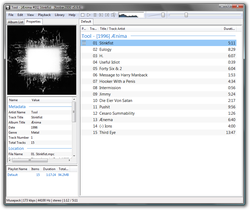
Another alternative that I tried to find another music player is lightweight but not compromising the main features and quality of Winamp. Finally I discovered Foobar2000, this application is fairly light but very easy to use and of course the main feature as a music player can still be relied upon.
A Music Player that is unique and interesting, and of course Free
I am now using the Music Player has reached version Stable v.1.1.1

The main features of Foobar2000 :
  • Supported audio formats: MP3, MP4, AAC, CD Audio, WMA, Vorbis, FLAC, WavPack, WAV, AIFF, Musepack, Speex, AU, SND... and more with additional components.
  • Gapless playback.
  • Full unicode support.
  • Easily customizable user interface layout.
  • Advanced tagging capabilities.
  • Support for ripping Audio CDs as well as transcoding all supported audio formats using the Converter component.
  • Full ReplayGain support.
  • Customizable keyboard shortcuts.
  • Open component architecture allowing third-party developers to extend functionality of the player.
  If you do not believe the performance please try it yourself and I'm sure this software for users of computers with lower specifications will immediately turn to this software
It is time for us to use the software for free but with a reliable quality
Download the latest version here
Read More …

How to Speed up Computer Performance

0 komentar

If at any time you feel that your computer was getting slow performance, there are some things that cause it to happen, ranging from temporary files or junk files, or because of a virus or it could also decrease the performance of your computer hardware.
Most of the problems experienced by computer users is slow because of the mess caused by the registry, corrupt and junk files that accumulate.
Here I will provide a way out pretty good and of course Free.
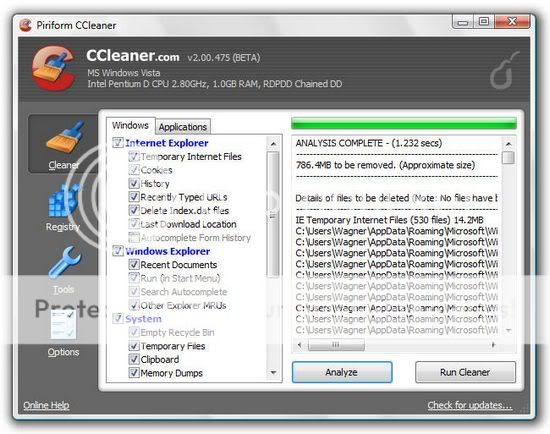
I always use CCleaner software, free software is very good but is able to clean the registry and make our computer's performance to be better
This software works by restructuring the registry, remove junk files and enhance the performance of our computers, even Hiren's boot CD also includes this software into a collection of software packages as an explanation of Piriform as the vendor of this software
CCleaner is our system optimization, privacy and cleaning tool. It removes unused files from your system - allowing Windows to run faster and freeing up hard disk space Valuable. Also it cleans traces of your online activities Such as your Internet history. Additionally it contains a fully featured registry cleaner. But the best part Is That it's fast (normally taking less than a second to run) and contains NO Spyware or Adware!
Cleans the Following:

Internet Explorer
Temporary files, history, cookies, Autocomplete form history, index.dat.
Firefox
Temporary files, history, cookies, download history, form history.
Google Chrome
Temporary files, history, cookies, download history, form history.
Opera
Temporary files, history, cookies.

Safari
Temporary files, history, cookies, form history.

Windows
Recycle Bin, Recent Documents, Temporary files and Log files.
Registry Cleaner
Advanced features to remove unused and old entries, Including File Extensions, ActiveX Controls, ClassIDs, ProgIDs, Uninstallers, Shared DLLs, Fonts, Help Files, Application Paths, Icons, Invalid Shortcuts and more ... Also comes with a comprehensive backup feature.

Third-party applications
Removes temp files and recent file lists (MRUs) from many apps Including Media Player, eMule, Google Toolbar, Netscape, Microsoft Office, Nero, Adobe Acrobat, WinRAR, WinAce, WinZip and many more ...

100% Spyware FREE
This software does NOT contain any Spyware, Adware or Viruses.

I think you need to try this software,
you can download this software at :
Download CCleaner
 
Read More …