Showing posts with label Virus. Show all posts

Flame Computer virus

20 komentar


Flame is the most advanced type of computer virus ever found. Kaspersky Lab announces the discovery of a highly sophisticated malware, named Flame, which is actively used as a weapon that targets cyber entities in several countries. Flame was found by the experts at Kaspersky Lab conducted research that was carried by the International Telecommunication Union (ITU). Results of analysis showed that the Flame is an attack the largest and most complex toolkit available today
Kaspersky Lab analysis results also showed that this program be used as a means of cyber spying and infect computers to steal sensitive data and information. Stolen data is then sent to one server command & control (C & C) Flame


.In cooperation with GoDaddy and OpenDNS, Kaspersky Lab succeeded in largely sinkholing domain used by C & C infrastructure & Flame. Below is a detailed summary of the results of analysis carried out:


  • Infrastructure C & C Flame, which has been operating for many years, direct offline as soon as Kaspersky Lab announces the discovery of its existence last week.
  • Currently there are more than 80 domain known as the Flame is used by C & C server and it and other related domains, which registered between 2008 and 2012.
  • In the last 4 years, the hosting infrastructure server C & C & Flame moved to various locations including Hong Kong, Turkey, Germany, Poland, Malaysia, Latvia, England and Switzerland.
  • C & C Flame Domain was registered with a false identity and various peregister impressive, with the time of registration from 2008.
  • Based on the sinkhole Kaspersky Lab, an infected computer is registered in the various regions including the Middle East, Europe, North America and Asia Pacific.
  • Flame Spreader seem to have a high interest towards the use of Autocad, in addition to PDF and text files.
  • Data are uploaded to the C & C Flame encrypted using a relatively simple algorithm. The stolen documents being compressed using the open source zlib and modification of PPDM.

  • After sending the code to remove traces of suicide, allegedly Flame virus has similarities with the Stuxnet virus first emerged.Stuxnet is a virus that was recently rumored to be made by the joint United States and Israel in order to cripple Iran's nuclear facilities, and how the virus Flame? virus is not known who is behind this flameFlame spread that some time ago in the Middle East region is as yet known who the author and what the motive of this sophisticated virus makers?Researchers from security firm Kaspersky Lab found that there were parts of the Flame malware that has similarities to a virus that attacks Stuxnet computer users in 2010.One of which is owned in common and Stuxnet Flame is disappearing without a trace and this is only realized researcher Kaspersky Labs.In addition, the constituent codes Flame and Stuxnet virus are considered to have some similarities, so there is speculation among two security researchers who estimate the Flame maker and Stuxnet is the same team or two teams that work together to create a second virus.this is reinforced by the findings of researchers in the module "207" used to infect a USB storage device by Stuxnet, and is also found in the virus Flame.Kaspersky researchers Flame and Stuxnet menyimpilkan that relate to each other and are made by the same team and with a slightly different purpose.Roel Schowenberg also explain the difference between Flame and Stuxnet. Stuxnet virus leads to more acts of sabotage and Flame is more directed to espionage to collect data.Researchers will continue to work hard to find information related to the mystery of the relationship between virus Flame with Stuxnet virus that has many similarities.
Read More …

How to remove 95p.com?

1 komentar

How to remove 95p.com? 95P.COM is a malicious browser hijacker after controlled by trojan virus
Some time ago I encountered a problem with my web browser, every time I perform a search via Google & Yahoo! always results redirected to an ad site with the address 95p.com
95P.COM is an inalienable part of a huge fraud going on today
When intending to look up some data on a real search engine, type in Their Victims query text, hit Enter and choose the link That seems a most Suitable for the Desired question but user gets rerouted to 95P.COM They never expected to visit.


It is a selective redirect as the design is to replace trustworthy search facility with a web-page That promotes a set of pages dedicated to Dubious products. Every time you hit a link on the Results page you go to a site you did not expect to pop up. Moreover, no matter how many entries you click in the SERPs, Will the outcome be the same. When you're browsing the Internet, the virus 95P.COM Will redirect your page requests to Uniquesearchsystem.com and displays fake errors on your computer screen. 95P.COM it must be removed IMMEDIATELY to the make your computer clean and safe.
I do not recommend you eradicate this trojan by antivirus usual, I remove it with SuperAntiSpyware, you simply download the version portablenya and run it in safe mode.
after SuperAntiSpyware managed to detect & remove the parent virus / trojan, I suggest you immediately do a full scan with the latest antivirus, yesterday I use Avira Free Antivirus with latest update database
in this way I managed to make my computer is clean of trojans 95p.com
Good luck
Download SuperAntiSpyware Portable Read More …

Kinds of different types of malware

1 komentar

For those of us computer users would know about malware, viruses etc., it all is set malicious programs that potentially damage our computer systems, potentially even damage the hardware also
Here I will explain about the various versions of the virus lab. Avira

Adware
Adware is software That presents in banner ads or pop-up windows through a bar That appears on a computer screen. Those advertising spots usually can not be removed and are consequently always visible. The connection data allow many conclusions on the usage behavior and are problematic in terms of data security.

Backdoors
A backdoor cans gain access to a computer by going around the computer access security Mechanisms.
A That program is being Executed in the background Generally enables the attacker Almost unlimited rights. User's personal data cans be spied with the backdoor's help, but are mainly Used to install Further computer viruses or worms on the relevant system.

Boot viruses

The boot or master boot sector of hard drives is mainly infected by boot sector viruses. Important information overwrite They Necessary for the system execution. One of the awkward consequences: the computer system can not be loaded any more ..


Bot-Net
A Bot-Net is collection of software bots, the which run autonomously. A Bot-Net cans comprise a collection of cracked machines running programs (usually Referred to as worms, Trojans) under a common command and control infrastructure. Boot-Nets server Various purposes, Including Denial-of-service attacks, etc., Partly without the affected PC user's knowledge. The main potential of Bot-Nets Is That the networks cans Achieve dimensions on Thousands of computers and its bandwidth sum bursts most conventional Internet accesses.

Dialer
A dialer is a computer program That establishes a connection to the Internet or to another computer network through the telephone line or the digital ISDN network. Fraudsters use dialers to charge users high rates Pls dialing up to the Internet Without Their Knowledge.

Distributed Denial of Service (DDoS)
Botnet drones are usually Able to attack servers, too: by sending numerous requests to a server from many clients simultaneously infected, They slow the server down. The server cans no longer answer the regular user requests.

EICAR test file
The EICAR test file is a test pattern That was developed at the European Institute for Computer Antivirus Research for the purpose to test the functions of anti-virus programs. It is a text file the which is 68 characters long and its file extension is ". COM" Should Recognize all virus scanners as a virus.

Exploit
An exploit (vulnerability) is a computer program or script That takes advantage of a bug, glitch or vulnerability leading to privilege Escalation or denial of service on a computer system. A form of an exploit for example are attacks from the Internet with the help of manipulated data packages. Programs cans be infiltrated in order to obtain higher access.

Grayware
Grayware operates in a way similar to malware, but it is not spread to harm the users directly. It does not affect the system functionality as Such. Mostly, information on the patterns of use is collected in order to Either sell these data or to place advertisements systematically.

Hoaxes
The users have obtained virus alerts from the Internet for A Few years and alerts against viruses in other networks are supposed to That spread is via email. These alerts are spread per email with the request That They Should Be sent to the highest possible number of colleagues and to other users, in order to warn everyone against the "danger".

Honeypot
A honeypot is a service (program or server), the which is installed in a network.
It has the function to monitor a network and to protocol attacks. This service is unknown to the user legitime - Because of this reason he is never addressed. If an attacker examines a network for the weak points and uses the services the which are Offered by a honeypot, it is protocolled and sets off an alert.

Keystroke logging
Keystroke logging is a diagnostic tool in software development Used That Captures the user's keystrokes. It cans be useful to determine sources of error in computer systems and is Sometimes Used to measure employee productivity on to perform certain clerical tasks. Like this, confidential and personal data, Such as passwords or pins, can be spied and sent to other computers via the Internet.

Macro viruses
Macro viruses are small programs are written in. That the macro language of an application (eg WordBasic under WinWord 6.0) and cans That spread is normally only Within documents of this application. Because of this, They Are Also Called document viruses. In order to be active, That They need the corresponding applications are activated and That one of the infected macros has been Executed. Unlike "normal" viruses, macro viruses do consequently not attack executable files but They do attack the documents of the corresponding host-application.

Polymorph viruses
Polymorph viruses are the real masters of disguise. They change Their own programming codes - and are therefore very hard to detect.

Program viruses
A computer virus is a program That Is capable to attach Itself to other programs after being Executed and cause an infection. Viruses multiply themselves unlike logic bombs and Trojans. In contrast to a worm, a virus always requires a program as host, WHERE the virus deposits his virulent code. The program execution of the host Itself is not changed as a rule.

Scareware
The term refers to software scareware the which has been Designed with the intent to cause anxiety or panic. The victim Could Be tricked and feels threatened and usually accepts an offer to pay and have the threat removed inexistent. In Some cases the victim is seduced to cause the attack Himself by making uterus think this intervention will of successfully remove the threat.

Script viruses and worms
Such viruses are extremely easy to program and Theys cans spread - if the required technology is on hand - Within A Few hours via email round the globe.
Script viruses and worms use a script language Such as Javascript, VBScript etc. to infiltrate in other new scripts or to spread is by activation of operating system functions. This Happens frequently via email or through the exchange of files (documents).
A worm is a program That multiplies Itself but That does not Infect the host. Worms cans consequently not form part of other program sequences. Worms are Often the only possibility to infiltrate any kind of damaging programs on systems with restrictive security measures.

Security Privacy Risk (SPR)
The term "SPR /" ("Security or Privacy Risk") refers to a program the which cans damage the security of your system, triggering the program activities you do not Want or harm your private environment.

Spyware
Spyware are so called spy programs "That intercept or take partial control of a computer's operation without the user's informed consent. Spyware is Designed to exploit infected computers for commercial gain. Typical tactics furthering this goal include delivery of unsolicited pop-up advertisements. AntiVir is Able to detect this kind of software with the category "ADSPY" or "adware-spyware".

Trojan horses (short Trojans)
Trojans are pretty common nowadays. We are talking about programs "That pretend to have a particular function, but That Show Their real image after execution and carry out a different function that, in most cases, is destructive. Trojan horses can not multiply themselves, the which differenciates Them from viruses and worms. Most of Them have an interesting name (SEX.EXE or STARTME.EXE) with the intention to induce the user to start the Trojan. Immediately after execution They changed from active and cans, for example, format the hard drive. A dropper is a special form of Trojan that 'drops' viruses, ie embeds viruses on the computer system.

Zombie
A Zombie-PC is a computer infected with malware That Is That programs and enables hackers to abuse computers via remote control for criminal purposes. The affected PC, for example, can start Denial-of-Service-(DoS) attacks at command or send spam and phishing emails.

Of the many types of malware, the name of the Trojan Horse and Backdoor is a type of malware that most of us encounter

Read More …

TrojWare.Win32.PSW.Delf aka Win32/Rebhip

5 komentar

A few minutes ago when the process start up Windows I get Antivirus Alert from my  Antivirus & Firewall Comodo Internet Security Premium
Comodo Internet Security Premium detect as TrojWare.Win32.PSW.Delf. ~ JHN @ 96179746 and by successfully removing an explorer.exe file in the folder
C://Windows/System32/Sistemas/explorer.exe
A recent Trojan Malware type
I do not know about the level of risk and characteristics of this Trojan infected computer
Analysis while I get information about this malware are:
Files with information


MD5: 5777ba474d097d2abf40598d2f1d0f85
SHA1: aa3a6166ea4aedcc38bcc6de09a5461cdad891cd
SHA256: 40fcebd534389454b2da3526f2bc2577666cc087386a59b65c c789e7ed229592
File size: 284,160 bytes


First discovered around mid-February 2011
Several other Antivirus to detect with the name of the Win32: Rebhip-B
Here are the full details of detection of the file:
AhnLab-V3 - 2011.02.06.00 - 02/06/2011 - Trojan/Win32.Llac
AntiVir - 7.11.3.52 - 12/02/2011 - TR / Spy.Gen
Antiy-AVL - 2.0.3.7 - 02/12/2011 - -
Avast - 4.8.1351.0 - 02/12/2011 - Win32: Rebhip-B
Avast5 - 5.0.677.0 - 02/12/2011 - Win32: Rebhip-B
AVG - 10.0.0.1190 - 12/02/2011 - Dropper.Agent.TZU
BitDefender - 7.2 - 02/13/2011 - Trojan.Generic.3197079
CAT-QuickHeal - 11.00 - 12.02.2011 - Win32.Trojan-Dropper.Agent.blsd.8
ClamAV - 0.96.4.0 - 02/13/2011 - Trojan.Agent-192 978
Commtouch - 5.2.11.5 - 12.02.2011 - W32/Dropper.AYXQ
DrWeb - 5.0.2.03300 - 13.02.2011 - BackDoor.Cybergate.1
eSafe - 7.0.17.0 - 10.02.2011 - -
eTrust-Vet - 36.1.8154 - 11.2.2011 - Win32/Spyrat! generic
F-Prot - 4.6.2.117 - 02.04.2011 - W32/Dropper.AYXQ
F-Secure - 9.0.16160.0 - 2/12/2011 - -
Fortinet - 4.2.254.0 - 12/02/2011 - W32/Llac.GFU! Tr
GData - 21 - 13/02/2011 - Trojan.Generic.3197079
Ikarus - T3.1.1.97.0 - 12/02/2011 - Worm.Win32.Rebhip
Jiangmin - 13.0.900 - 2/12/2011 - Trojan / Delf.mxd
K7AntiVirus - 9.83.3836 - 12.02.2011 - Trojans
McAfee - 5.400.0.1158 - 13/02/2011 - Generic PWS.di
McAfee-GW-Edition - 2010.1C - 2/12/2011 - Heuristic.BehavesLike.Win32.PasswordStealer.A
Microsoft - 1.6502 - 02/12/2011 - Worm: Win32/Rebhip.A
NOD32 - 5868 - 02/12/2011 - Win32/Spatet.A
Norman - 6:07:03 - 12.02.2011 - W32/Rebhip.A
nProtect - 2011-01-27.01 - 02/02/2011 - -
Panda - 10.0.3.5 - 02/12/2011 - Trj / Agent.KMX
PCTools - 7.0.3.5 - 12.02.2011 - Malware.Spyrat
Prevx - 3.0 - 02/13/2011 - Medium Risk Malware
Rising - 23.44.05.00 - 12/02/2011 - -
Sophos - 4.61.0 - 02.12.2011 - Troj / Agent-Moy
SUPERAntiSpyware - 4.40.0.1006 - 12/02/2011 - -
Symantec - 20101.3.0.103 - 02/13/2011 - W32.Spyrat
TheHacker - 6.7.0.1.126 - 02/10/2011 - -
TrendMicro - 9.200.0.1012 - 12/02/2011 - TSPY_SPATET.SMT
-TrendMicro HouseCall - 9.200.0.1012 - 02/13/2011 - TSPY_SPATET.SMT
VBA32 - 3.12.14.3 - 02/11/2011 - TrojanDropper.Agent.blsd
VIPRE - 8398 - 02/12/2011 - Worm.Win32.Rebhip.A (v)
ViRobot - 2011.2.12.4307 - 12/02/2011 - Backdoor.Win32.Poisonivy.283648
VirusBuster - 13.6.196.0 - 12/02/2011 - Worm.DR.Rebhip.Gen

Read More …

Steps to cleaning Win/32 Ramnit

52 komentar

In the post How to remove Virus Ramnit, which has been explained that this virus will inject a file that has the extension EXE, DLL and HTM / HTML both program files and Windows file system, therefore cleansing should be done in DOS mode. To facilitate cleaning please use Hiren's BootCD, Use the latest version to get the antivirus with the latest virus database. In Hiren's BootCD already Dr.Web Cure It!

Or you can download the Dr.Web Live CD here:
http://www.freedrweb.com/livecd/?lng=en

1. For cleaning can be done optimally, you should scan all USB flash or external HDD, this is by Comodo Internet Security Premium, this can be done after the cleaning process is complete virus, I suggest you to use Comodo Internet Security Premium Antivirus and Firewall with a blend of strong. You can get it for free at Http://www.comodo.com


2. Before doing the cleaning should block viral duplicate files by using the "Software Restriction Policies". This feature is only there on the operating system Windows XP Pro, Vista, 7, Server 2003 and Server 2008 in the following manner:


1. Click the [Start]

2. Click [Run]

3. In the Run dialog box, type secpol.msc and then click the [OK]

4. Once the screen appears "Local Security Policy", right-click menu [Software Restriction Policies "and click" Create New Policies "or" New Software Restriction Policies "if using Windows Vista / 7

5. Then right click on the "Additional Rules", then select "New Hash Rule ..."

After that screen will display "New Hash Rule" In the column "Hash Files", click the [Browse](example C: \ Windows \ Explorermgr.exe) and specify one of the viruses that have duplicate file icon "folder" with a size of 105 KB and click the [Open]. In the "Security Level", select [Disallowed]. Then click the [OK]
Use the Live CD on the Dr.Web GUI mode so you had no trouble using Dr.Web Live CD, Linux Desktop Display As yet very easy to use. Then the scan to finish,
After that restart your computer
Or if you use Hiren's BootCD you can directly use the Live CD mode by selecting the Mini Windows XP (For those of you who are not familiar with Linux)

Read More …

Attrib command in Command Prompt

1 komentar

As a computer technician is required to understand the Attrib command at Command Prompt. It would be very useful to restore the folder attributes are hidden by the virus. Actually it's been a lot of tools to quickly change the attributes, eg using Antivirus SMADAV. But will lebuh good if we also understand how to change the attributes of the folder manually by Commandprompt.
Attrib command is used to display and set the attribute which is owned by a file or folder. The format of the writing of this Attrib command is:

attrib [{+ r |-r}] [{+ a |-a}] [{+ s |-s}] [{+ h |-h}] [[Drive:] [Path] FileName] [/ s [/ d]]

Description:


+r: Sets the read-only file attribute.
-r: Clears the read-only file attribute.
+a: Sets the archive file attribute.
-a: Clears the archive file attribute.
+s: Sets the system file attribute.
-s: Clears the system file attribute.
+h: Sets the hidden file attribute.
-h: Clears the hidden file attribute.
/s: Applying the Attrib command at a directory and its subdirectories.
/d: Implementing the Attrib command at a directory
/? : Displays the help of a list of commands
[Drive:] [Path] FileName: Specifies the location and name of a file or directory to be displayed or changed attributnya.

For example the use of this Attrib commands can be seen in the article "How to restore Feel that are hidden by the virus." In this example Attrib command used was:

D: \ Attrib-r-s-h / s / d

From the above explanation we can see that this command means "remove read only attributes, system and hidden from the files and directories that exist on drive D".


Read More …

Top 30 Best Antivirus 2011

61 komentar

Virus is the thing that will never be separated from the computer, a malicious program that will forever continue to haunt the users computer. Here is a study of 30 ativirus. The best Antivirus 2011 is somewhat different than the best antivirus 2010. If in the year 2010 based on survey results and tests performed by various companies engaged in the review and testing of technology products crowned as the best antivirus Bitdefender 2010. So the current status of antivirus Bitdefender shifted to the second position, was replaced by competitors. The best Antivirus 2011 is Ad-Aware Pro Internet Security 9.0 is based on the results of testing from PC Magazine's team of technicians. For that test results here may be different from other test results.
Including myself who served until this moment still recognize that the best antivirus and firewall is Comodo Internet Security Premium, it's from my experience using several antivirus and CIS Premium provides the most satisfactory result for my computer


Assessment of the best antivirus 2011 is based on ease of use, performance in protecting computer antivirus, speed to clean the virus that infects a computer, data recovery infected with the virus, antivirus updates, and the ability to protect computers from virus attacks and other malicious scripts. The following is a list of the best antivirus 2011 version of PC Magazine


1. Ad-Aware Pro Internet Security 9.0
2. BitDefender Antivirus Pro 2011
3. BullGuard Antivirus 10
4. Double Anti-Spy Professional v2
5. eScan Anti-Virus 11
6. F-Secure Anti-Virus 2011
7. G Data AntiVirus 2011
8. Kaspersky Anti-Virus 2011
9. McAfee AntiVirus Plus 2011
10. Norton AntiVirus 2011
11. Outpost Antivirus Pro 7.0
12. Panda Antivirus Pro 2011
13. PC Tools Spyware Doctor with AntiVirus 2011
14. StopSign Internet Security 1.0
15. TrustPort Antivirus 2011
16. Trend Micro Antivirus Titanium 2011 +
17. Webroot Spy Sweeper with AntiVirus 2011
18. Ad-Aware Free Internet Security 9.0
19. AVG Anti-Virus Free 2011
20. Comodo Antivirus 5.0
21. Digital defender free 2.0
22. Immunet Protect Free 2.0
23. Malwarebytes' Anti-Malware 1:46
24. Cloud Panda Antivirus 1.1
25. avast! Free Antivirus 5.0
26. Avira AntiVir Personal 10
27. Microsoft Security Essentials 1.0
28. Prevx 3.0
29. VIPRE Antivirus 4.0
30. ZoneAlarm Antivirus 2010

Please check antivirus software above may be taken into consideration for choosing antivirus software to be installed on the computer, may be useful

Read More …

How to remove virus W32/Ramnit

62 komentar

One more line of recalcitrant virus latest version, a new virus variant is similar Sality obstinate, his name W32/Ramnit.

This morning one of the computers in the office and the new weird virus in my opinion, almost similar to the virus but more powerful shortcut. This virus belonged to the trojan / backdoor, it will be active if the target computer connected to the Internet and one of weapon. dangerous and nauseating computer users to download other viruses, "
Viruses have also downloaded the names and sizes vary so complicate anti-virus program for detection and cleaning your computer
From my studies after recovering office computer. Dr.Web Cure It is in the package Hiren's BootCD 13.0 and there was still some virus files on my flash, I try to analyze this virus:
First is the emergence of the Internet Explorer pop-up broser containing an offer or advertisement of investment, games and promotional programs. The second symptom is the change icon removable media (USB Flash, External HDD, and the like) into a folder icon. When a user accessible USB flash will get a warning "Access Denied". In addition it appears also the message "compressed zip folders" when USB flash access. Another symptom is the appearance of many files with the file name "Copy of Shortcut to (1). Lnk" s / d "Copy of Shortcut to (4). Lnk" in the USB Flash, this is very disturbing at all, but the virus is still not able to penetrate Folder protection with Unicode Characters I Made Unique.

USB Flash used this virus as a medium for spreading itself by using the autorun feature of Windows. For bodies active virus can be automated, W32/Ramnit also create the file autorun.inf and 4 (four) other shortcut files with the name "Copy of Shortcut to (1). Lnk" s / d "Copy of Shortcut to (4). lnk ".

After W32/Ramnit successfully infects a computer it will also mengifeksi file [C: \ Windows \ Explorer.exe and C: \ Windows \ System32 \ Winlogon]. After successfully carry out the action, this virus will call the other parent files assigned to be active in memory. To trick the user he will then call the application [C: \ Program files \ Internet Explorer \ Iexplore.exe].

Spend bandwidth and virtual memory
If the computer suddenly show information "Virtual Memory Minimum Too Low" while you're not doing anything so beware. Because the virus will always do an internet connection and call the website constantly with different content. Connection is done continuously resulted in a slow computer at the time of use. In some cases the virus can also cause the "Virtual Memory Minimum Too Low" It's very frustrating because our memory is full of unnecessary files from the file the virus.

How to Clean W32/Ramnit?
Because W32/Ramnit attack EXE files, DLLs and HTM / HTML, the best healing method is through DOS mode. Tools like Hiren's BootCD 13.0 is combined with an antivirus program Dr Web Cure It is a combination of the most effective when cleaning virus this Ramnit

The following are detailed steps to clean the virus Ramnit
Hopefully helpful

Read More …

ARTAV, an antivirus created by the child's 2nd grade junior high school

1 komentar

Correction:
this afternoon I get information that there are similarities Source code in this Artav Antivirus Al VirusScan with Source Code, for that with this I conclude that Artav Antivirus is not 100% made of Arrival Dwi Sentosa
But I am quite proud of Arrival Dwi Sentosa able to modify it to become Antivirus Artav this, though I regret very much to the recognition of Arrival if virus is 100% made herself with the help of his brother

More information about Al Virus scan :
http://planet-source-code.com/vb/scripts/ShowCode.asp?txtCodeId=71992&lngWId=1

This world a lot of antivirus products, and most are made by a team within a company.
But this time there which I think is extraordinary, a child's grade 2 secondary schools in Indonesia successfully completed an AntiVirus, an antivirus that is written with Visual Basic and named ARTAV Internet Security, Antivirus are also essential requirements an antiviral, such as scanners, Update the virus databases even Mail Scanner, Link Scanner, and others. Here are the data themselves antivirus programmers are:

Name: Arrival Dwi Sentosa
Nick: Arrival
Address: Jl.Bojongsoang Kabupaten.Bandung
City: Bandung
Hobbies: Create Program
Religion: Islam
No Hp: 085721330422
Activity: Learning in the Junior
Planning: Want Advancing Technology in Indonesia khsusnya Programming
Status: Single
Education:
Elementary School Cipagalo 1, from 1-2 grade
Elementary School Cijagra 1, from 2-4 class
Sekelimus Elementary School, from grade 4-6
SMP Negeri 48 Bandung

According to the admission in the manufacturing process is assisted Arrival antivirus sister school 2nd grade high school, "my brother and I helped design that makes programmnya, because I can not design a" he said
You're curious about this antivirus? Please direct to the official website http://www.artav-antivirus.com
Read More …

Error code on the Blue Screen Of Death (BSOD)

14 komentar

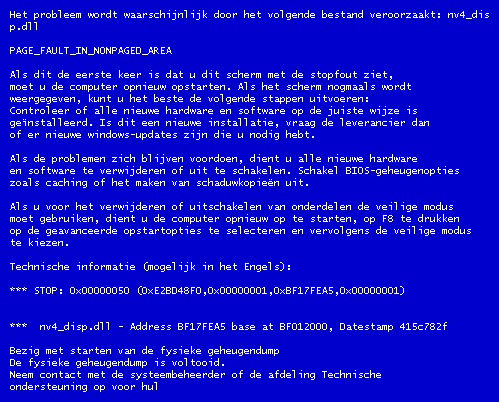
For Windows XP users may already have experienced a fatal error in Windows, Computer was suddenly dead and appears a blue screen with writing the code the code is not clear, this is called the Blue Screen Of Death or BSOD
Here I will try to explain the causes and how to solve this BSOD, especially is the intent of the codes that appear on our screens

1. IRQL_NOT_LESS_OR_EQUAL (0X0000000A)
This is a mastermind of pure culprit in the BSOD. Since most of the BSOD, this message most often appears. The error message is caused mostly because there is a mismatch drivers installed on your computer.

List of Causes:
* Problem drivers clash or do not match
* Problems Video Card, this cover is on the overclocked video card exceeds the limit or you just changed video card and you do not uninstall the old video card drivers from different chipset
* Issues Audio Card, include configuration errors or bugs in the sound card driver

2. NTFS_FILE_SYSTEM Information or FAT_FILE_SYSTEM (0X00000024) or (0X00000023)
Well, this message at least have a little "disconnected" giving a picture of where the damage was, which is on the partition or housing a filesystem, but not in HD. We can check by examining the SATA or PATA cable or can check the partition with chkdsk tool.

3. UNEXPECTED_KERNEL_MODE_TRAP (0x0000007F)
When you get a message like this, can be caused by:
* Hardware Overclock excessive
* Computer component overheating
* BIOS corrupt
* Memory and CPU is disabled

4. DATA_BUS_ERROR
This message is caused because of the possibility that memory or the memory slot on the motherboard is damaged.

5. PAGE_FAULT_IN_NONPAGED_AREA
Due to hardware damage, including main memory, video card memory, or memory in the processor (L2 Cache)

6. INACCESSIBLE_BOOT_DEVICE
Due to a mistake in the wrong hard drive jumper configuration, boot sector viruses, the wrong IDE controller drivers, or chipset driver error.

7. VIDEO_DRIVER_INIT_FAILURE
An error occurred on the installation of video card drivers are less than perfect, restart during installation or can also occur because of errors in the installation of the driver.

8. BAD_POOL_CALLER
This error can occur because of errors or incompatible drivers. Often occurs during installation of XP from an upgrade, or not from the new installation.

9. PEN_LIST_CORRUPT
This message is caused due to a damaged RAM

10. MACHINE_CHECK_EXCEPTION
Disability caused by the CPU, or an aggressively overclocked, and power supply shortages or damaged resources.

So hopefully useful and you can find the location of the damage of your computer

Read More …

Causes of a slow computer performance

2 komentar

Almost every computer will experience a decline in performance from wajtu to time, it was because of some things that can make the system crash or the system experienced heavy performance that we do not really need.
Here I will try to explain what things are slowing down our computer's performance in terms of the Software or system.

Adware
This is a program that will display ads on the computer. It would be disturbing because adware generally will use the resources of the computer, as a result computer is running slow. There is also a type of adware that appear in pop-ups that can interfere when you're working.

Brute Force
An activity to break the password by combining numbers and letters in sequence. Very dangerous if with this technique, people who are not entitled to succeed to know your password and then misused. To overcome this problem, it's good password that is used not only consist of numbers and letters but also consists of symbols like $, #, &, and others.

DDoS
Is a continuation of a Distributed Denial of Service, where a server or computer is attacked with bombarded shipment data in a very large size of many computers simultaneously. As a result the computer is difficult to access or damage to hardware not being able to accommodate very large data items.

Exploit
That is an application that tries to find and attack the weaknesses of the system to gain access to or for the purpose of infecting the system or computer.

Fake Antivirus
The way it works is by making as if a computer virus and suggest to buy anti-virus to overcome the virus.

Hoax
That is plain hoax spread through email or website. The effect is a panic or a lot of readers who were deceived. Another result is burdensome because of the Internet network of hoax chain messages are delivered to another person.

Keylogger
It is one threat that is dangerous. Keylogger will record that entered through the keyboard input to be stored or sent to someone who normally used for purposes that are not good. This is in particular to watch out for when you enter the password in public places like cafes. Password that you entered via the keyboard can be known and may be used for purposes that are not good.
One way to avoid a keylogger is to use On Screen Keyboard now must enter the password. On Screen Keyboard can be run from the Windows programs that are on Programs | Accessories | Accessbility or by typing in "OSK" from Start | Run on Windows Operating System.

Malware
Usually found on the bootsector on the disk, then change the course of the first run. Systems that are usually affected first is the Operating System. Infections in Operating System makes it easier malware to spread themselves or spread the virus on storage media such as CD ROM or Flash Disk.

Phishing
Is a form of fraud on the internet by making someone would provide important information that is not entitled to know. For example, by creating a website similar to a bank website. A victim does not realize he had been deceived and then enter the password that setealh known by the manufacturer can be used to deplete savings victim.

Rootkit
That is a program that aims to hide other programs running. Usually used to spread malware, virus, or keylogger.

Spam
Mean an unexpected email. Usually an email advertisement or a teaser for a person visiting a particular website which is actually a phishing or to disseminate malware. Messages can be sent in large quantities, so spend time to remove them.

Spyware
Is a program that works to spy on users with the purpose of obtaining critical information such as credit card numbers, PINs or passwords that can harm the victim because the leaking of such information.

Trojan
Acting as if he dalah good program that can be used to help users work. But, actually in it there are functions that endanger the overall system or to steal confidential information. Trojans easily spread to other computers.

Worm
Is malware that can multiply and then sends copies itself over a network without having a specific activity performed by users. The worm can be dangerous because it can become an entry point for viruses, malware or other destructive programs.

So my explanation may be useful.
Read More …

How to remove virus shortcuts without an AntiVirus?

13 komentar

Yesterday I tried to access Google Analytics blog, almost 90% of visitors from more than 30 countries found this blog with a keyword shortcut around the virus, the virus was present this shortcut is rampant throughout the world. For that I will try to discuss the return of the virus.
PIF Virus / Starter or better known as the virus shortcut upset victim with a lot of shortcuts that are created by the virus. Fuss, if ways of handling this virus is not right then he actually will come back again, again and again

Here are some ways of a virus analyst at MG Vaksincom Lat shortcut to stop the flood caused this virus:

1. Previously turning off system restore process.

2. Turn off the process of Wscript file located in C: \ Windows \ System32, by using tools such as CProcess, HijackThis or can also use the Task Manager of Windows.
3. Once off the process of Wscript, we need to delete or rename the file so as not to be used temporarily by the virus.

For the record, if we are to rename the file wscript.exe it automatically, it will be copied again in the folder. Therefore, we must find where the file wscript.exe others, usually in C: \ Windows \ $ NtServicePackUninstall $, C: \ Windows \ ServicePackFiles \ i386.

Unlike other VBS viruses, we can change the Open With from the vbs file into Notepad, the virus that matters is berextensi MDB Microsoft Access file. So Wscript DATABASE.MDB will run the file as if he is VBS file.

4. Delete an existing parent file in C:\Documents and Settings\\My Documents\database.mdb, for every time the computer boots will not load the file. And do not forget we also open MSCONFIG, disable the run command.

5. Now we are going to delete the files autorun.inf. Microsoft.INF and Thumb.db. Way, click the START button, type CMD, and moved to the drive to be cleaned, for example, drive C:\, then we have to do is:


Type C:\del Microsoft.inf/s, this command will be to delete all files microsoft.inf the whole folder on drive C:. Meanwhile, if you want to move the drive to stay just renamed drive example: D:\del Microsoft.inf/s.

For the autorun.inf file, type C:\del autorun.inf /s/ah/f, the command would be to delete the autorun.inf file (syntax /ah/ f) is used because the file is taking attrib RSHA, as well as to file Thumb . db also do the same thing.

6. To delete files older than 4 files, we must find a way search files with extensions. Lnk size 1 kb. In the 'More advanced options' make sure the option 'Search system folders' and 'Search hidden files and folders' are both checked.

Please be careful, not all files shortcut / LNK file size of 1 kb is a virus, we can distinguish it from an icon, size and type. For a shortcut icon is created virus always uses icons 'folder', size 1 kb and type 'shortcut'. While the correct folder should not have 'size' and its type is 'File Folder'.

7. Fix the registry has been changed by the virus. To speed up the process of repair registry copy the script below on the program 'notepad' and save with the name 'repair.inf'. Run the file in the following manner:

- Right-click repair.inf
- Click Install

[Version]
Signature = "$ Chicago $"
Provider = Vaksincom Oyee

[DefaultInstall]
AddReg = UnhookRegKey
DelReg = del

[UnhookRegKey]
HKLM, Software \ CLASSES \ batfile \ shell \ open \ command ,,,"""% 1 ""% * "
HKLM, Software \ CLASSES \ comfile \ shell \ open \ command ,,,"""% 1 ""% * "
HKLM, Software \ CLASSES \ exefile \ shell \ open \ command ,,,"""% 1 ""% * "
HKLM, Software \ CLASSES \ piffile \ shell \ open \ command ,,,"""% 1 ""% * "
HKLM, Software \ CLASSES \ regfile \ shell \ open \ command,,, "regedit.exe"% 1 ""
HKLM, Software \ CLASSES \ scrfile \ shell \ open \ command ,,,"""% 1 ""% * "
HKLM, SOFTWARE \ Microsoft \ Windows NT \ CurrentVersion \ Winlogon, Shell, 0, "Explorer.exe"
HKLM, SYSTEM \ ControlSet001 \ Control \ SafeBoot, AlternateShell, 0, "cmd.exe"
HKLM, SYSTEM \ ControlSet002 \ Control \ SafeBoot, AlternateShell, 0, "cmd.exe"

[Del]
HKLM, SOFTWARE \ Microsoft \ Windows \ CurrentVersion \ Run, Winupdate
HKCU, SOFTWARE \ Microsoft \ Windows \ CurrentVersion \ Run, explorer

Please leave comments, suggestions or constructive criticism, may be useful to readers.
Read More …

How do I clean the virus sality?

2 komentar


A few days ago I again troubled by a virus which is already in circulation long enough, I can only detect Antivirus without being able to eliminate the virus.
The virus is often detected by antivirus software by name or W32Sality.AE Sality this is that many viruses are spread through a network that uses windows default share folder or share with full access.

Sality virus will attack and inject a lot of files ending in *. exe, disable the task manager, disable Regedit and make your windows can not run in safe mode. And worse, this Sality able to destroy some files ending in *. exe to not be used again.

To remove it automatically, you can update the antivirus software you use and do scanning and repair thoroughly. But if your antivirus does not solve this sality virus attack, then you can delete it manually. How to eradicate the virus W32Sality.AE or more often known by the name of this sality virus manually from your computer? The following I describe how to clean removes virus

1. Disconnect your computer from the network both LAN and internet.
2. Turn off system restore feature you during the process of cleaning the virus sality
3. Download Sality Repair here
4. Extract the file and right click the file SalityRepair repair.inf then right click and click Install
5. Turn off all active applications and are you open
6. Download Norman Malware Cleaner here or download directly here
7. Norman Malware Cleaner Change the extension from. Exe to. Cmd for application Norman Malware Cleaner is not infected by the virus sality
8. Make use Norman Malware scanning Cleaner.cmd (extension. Exe is your change to. Cmd)
9. Restart your computer after the cleaning process is complete
10. Download FixReg here
11. Extrack FixReg.rar and run the registry that is in the folder FixReg
according to the windows that you use.
12. Restart your computer.
13. Check task manager regedit and forth to make sure your computer has been recovered. You can also scan in safe mode to make sure your computer is correct - really clean from the virus sality.

Actually, almost all antivirus can detect and eradicate this virus sality. You can update your antivirus and do the scanning and repair with antivirus you use. If your antivirus was not able membasminya, then tips it manually eradicate the virus sality above could be a powerful solution free from attack W32Sality.AE
Read More …

Top 4 Best free Antivirus

0 komentar


Actually, today I will try to discuss about the Hiren's Boot CD 11.0 is remarkable, but I delayed till tomorrow.
Now I will try to show some good performers Free Antivirus according to my experience:
The purpose here is the best in terms of security, and memory consumption that influence the performance of our computer.
Here I include four antivirus which became a recommendation from me:

1 Comodo Internet Security
Comodo prioritize the security of Internet attacks with a very strong firewall defenses, all activities will be monitored very well, so if there is any suspicious activity can be directly prevented.
In terms of antivirusnya, Comodo is very sensitive. Comodo Internet Security suited for those of you who are always online to the Internet. visit www.comodo.com
Comodo Internet Security please download here

2. Avira Antivir Personal
This is an alternative antivirus for those of you who do not always online, because it has the ability Offline antivirus update, in terms of this antivirus defense has a pretty good detection capability, as well as self defense from a virus attack.
Download Avira Antivir Personal here

3. AVG Free

AVG is the antivirus product with the user very much, more than 80 million users worldwide, the ability of detection is good enough but when the scan would take a lot of memory so make the computer becomes feels slow. This could be an alternative for your free Antivirus
Download AVG Free here

4. SmadAV
Antivirus made in Indonesia, this performance is very light and capable of removing viruses made in Indonesia, in terms of defense capabilities are not adequate, but there is a feature to open some important tools of Windows which is disabled by viruses, such as regedit, task manager, run command and so forth, one click we can all be opened without manually changing the registry.
SmadAV very good when combined with one of the top three antivirus
Download SmadAV Free here


Read More …

How do I delete the autorun.inf file created by SmadAV Antivirus?

38 komentar

Before that, I apologize for the last few days I do not post because it is too busy with work.
to atone for it all this time I will discuss about how menhapus autorun.inf in flash is created by antivirus SmadAV.
For those of you who use artificial SmadAV antivirus Indonesia may find Autorun.inf folder that is created automatically to protect your drive. Perhaps you are one of those who ask how to delete a folder as where Autorun.inf SmadAV it from your computer


Here's how you can use to remove these folders SmadAV Autorun.inf.

First: You can use the setting of SmadAV itself.


* Open SmadAV and click on the Settings tab
o Remove the Checklis in writing: "Aktifkan Smad-Lock pada saat flashdisk dicolok."

You can also delete the folder by typing a few commands in notepad and save with the extension *. bat samples: removeautorun.bat.

rd/s/q D:\con\aux\nul. Autorun.inf This is locked by Smad? V to protect your Flash-Disk from virus infection.
rd/s/q D:\con\aux
rd/s/q D:\con

Note: D in the code represents the location of your flash, replace and adjust with the existing drive letter on your computer. If you've completed typed and saved, removeautorun.bat Double-click the file.

Second: Using Smad Lock Remover or Unlocker
so hopefully can help you delete the file
Read More …

How to secure folders from all variants of the virus?

3 komentar

Previously I apologize if my writing is probably not good enough or you already know about the following tips, if you have advanced in terms of virus please provide comments to the content of the new tips that may be very useful for me and other readers.
Sometimes we get annoyed with the virus that causes all folders in a flash to make us disappear, not really lost but is hidden by a virus, indeed one of the many viruses hide infection effects folder.
For the moment there are antivirus software that has been used almost the same way to prevent this it my way, namely by adding a character who is not on your keyboard to name the folder. namely SmadAV, he adds character between folders Smadlocknya triangle like this: ΔSmadlockΔ, we can make such
For example: File Folder named Budi, if connected to a computer that is infected, we will be lose. click start> Run then type in charmap. Then press Enter, then select characters strangely dyang none on the keyboard, eg, ǽ, Ǻ, œ, E or else your will, then copy and paste and add to the file name is Budi, so the file becomes ΦBudiΦ reason, almost all type of virus can not penetrate this folder
Save all your important files on here, can document or even exe file
But remember, if you want to open these files please move the file outside the folder, because there are several files that can not be run in the folder.

How does it work now the folder? virus are basically just reading alfabetic characters and characters on the keyboard, if we use characters from charmap assumed that the virus is a file system or even a virus can not read the characters.
now you know the surefire way to secure the folder and its contents, may be useful someday. good luck

Read More …

How to Remove Virus shortcut Harry Potter

79 komentar

How to Remove Virus shortcut Harry Potter ?
Searched on facebook friend complained that her computer was attacked Shortcut virus, a type virus harry potter, there is no harm in me trying to give a little review and how to eradicate this virus.
Your computer (Windows XP with this particular) have a virus / malware folder shortcut harry potter ... lnk, microsoft, new folders steps Insha Allah I will give below can help overcome them.

According to my analysis of how the virus / malware is as follows:


* Virus / malware will put the file database.mdb, thumb.db, Autorun.inf, folder shortcut harry potter .... Lnk, folder shortcut microsoft, new folders and shortcuts on my document folder.
* Virus / malware will enable the file wscript.exe and thumb.db files residing in the folder windows system32 folder to run database.mdb files on my document.
* Shortcut folders had to be linked to files thumb.db.
* If you open this shortcut folders it will activate the file and the file wscript.exe thumb.db and will create a duplicate of an existing shortcut folder on your computer, thumb.db file and the autorun.inf file on all drives C.
* If your computer is virus / malware was then the whole drive C: you will have duplicate an existing shortcut folder on your computer, thumb.db file and the autorun.inf file. A scan will also drive, CD ROM, flash and your network as a medium of spreading the virus / malware.

There are two methods to remove the virus.

Method 1 by using an updated antivirus. Antivirus which can recognize the virus (author only has this antivirus 3), namely: 1. AVG: detected as VBS Worm. AVG will delete all the duplicate shortcut folders and files of the virus earlier.
2. Norton Antivirus 2009: detected as VBS Runauto. Norton will delete all files on drive C. thumb.db You can delete the Autorun.inf file and all copies of the shortcut folder manually.
3. Avira Antivir Premium: detect it as malware DR / Agent.JP.
4. Antivir will delete all files on drive C. thumb.db

You can delete the Autorun.inf file and all copies of the shortcut folder manually. Method 2 with the manual method. 1. Turn off System Restore.
2. Turn off the process wscript.exe virus using tools CProcess / CurrProcess (you can download via google). Run CProcess, search on name wscript.exe process tab then right click and click the kill procesess selected.
3. Open windows explorer, click tools menu options, folder options, view, click Show hidden files and folders, click / uncheck the Hide extensions for Known file types and Hide protected operating system files.Klik OK.
4. Open My Documents. Delete files database.mdb.
5. Click the Search button. Click All Files and Folders. In the All or part of the file name type: thumb.db, click on the Look in my computer. Delete all files that have been found. Repeat the steps above and delete all files that are found again.
6. Click the Search button. Click All Files and Folders. In the All or part of the file name type: Autorun.inf, click on the Look in my computer. Delete all files that have been found. Repeat the steps above and delete all files that are found again.
7. In step 6 actually a virus is gone or no longer active but there are still remaining duplicate shortcut folders created by virus / malware was.
8. If you want to eliminate them, you must be careful at all between the shortcut created by the virus with congenital shortcut on windows. Key features of the shortcut folders created by a virus that is when we appoint these folders will display a link from the shortcut that is in the direction Windows/System32. That we have to delete the shortcut.
9. How to find the folder shortcut: Click the Search button. Click All Files and Folders. In the All or part of the file name type: *. lnk, click on the Look in my computer. You should choose based on the characteristics of the shortcut folders created by the above virus.
10. You can delete the registry created by this virus using HijackThis tool. (Can download via google). Click Scan only and search system in the HKCU \ ... \ ... database.mdb, HKLM \ ... \ .... associated with windowsxp cd (I forget the name of its length, this is also for that but sometimes there are sometimes not), also HKCU \ ... \ .... disableregedit = 1. click the button fixed.
11. Now restart your computer. Actually if we do not delete the registry last (step 10) is not a problem, but at the time of restart windows will display two dialog boxes are essentially the first to find the file that we remove this database.mdb, who both asked to enter the cd windowsxp. click Ok aja uda ga problem. Then we'll likely regedit was disabled by a virus. This is also problematic if you ga ga brain often manipulated the windows registry. Method To counteract the virus comes back

This virus works if we click the new folder shortcut harry potter, microsoft. After we click the shortcut folder then he will find a file that is located in the folder wsript.exe windows system32 folder. With active wscritp.exe the virus will start spreading. So the key to active the virus is in the file wscript.exe. For that we have to turn off the road renaming wscript.exe.

The trick is:

1. Open windows explorer, click tools menu options, folder options, view, click Show hidden files and folders, click / uncheck the Hide extensions for Known file types and Hide protected operating system files.Klik OK.

2. Open the folder C: \ Windows \ system32 \ dllcache. Folder is a collection of backup files from the files in the System32 folder. Find the file wsript.exe then right click to rename eg wscriptx.exe. Then open the C: \ Windows \ system32, find the file then right click rename wsript.exe such a wscriptx.exe too.
Thus my explanation of the shortcut virus, may be useful

Read More …